
lesliey81661118
Participant
March 5, 2018
Answered

cmd or opt + space bar ; space bar doesnt work

  • March 5, 2018
  • 2 replies
  • 2642 views

I zoom in or out of sequence with command + mouse wheel or option + mouse wheel, and then press the play button (space bar), what happens to the command + space bar or option + space bar? If you press the space bar alone, it works ; when you press the command + space bar or the option + space bar, it is very inconvenient because the space bar does not work.
    This topic has been closed for replies.
    Correct answer gener7

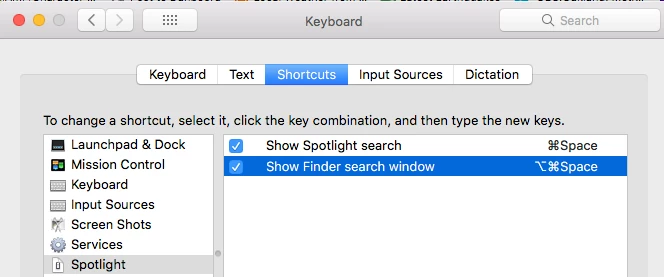
    If this is OSX, know that OSX assigns the Cmd Spacebar for Spotlight and the Opt Cmd Spacebar key for the Finder search window by default.

    Go into System Preferences > Keyboard > Shortcuts > Spotlight and uncheck these two to disable them. Assign another shortcut key if you really need one.

    2 replies

    Kevin J. Monahan Jr.
    Community Manager
    Community Manager
    April 2, 2018

    Hi LeslieY,

    Are you still experiencing this issue or have you solved it? Please let us know.

    Thanks,

    Kevin

    Kevin Monahan - Sr. Community and Engagement Strategist – Adobe Pro Video and Audio
    norm_nanstiel
    Participant
    September 1, 2023

    Yesterday the space bar worked fine. Today it does not work on Adobe apps. I tried all the suggestions above but the space bar still doesn't work.

    gener7
    Community Expert
    gener7Community ExpertCorrect answer
    Community Expert
    March 5, 2018

    If this is OSX, know that OSX assigns the Cmd Spacebar for Spotlight and the Opt Cmd Spacebar key for the Finder search window by default.

    Go into System Preferences > Keyboard > Shortcuts > Spotlight and uncheck these two to disable them. Assign another shortcut key if you really need one.

    lesliey81661118
    Participant
    May 14, 2018

    thx