



Code sample and video on how to SetWorkArea in a Sequence
Hi all you SDK’ers,
Today a question came across our desk here at CEP World Headquarters, and I thought that the answer might be worth posting here.
The original question was along the lines of; "I’m trying to get the current work area, and to set a specific work area." Keep in mind that this is not edit, "In" and "Out" points, but rather what is shown in the Work Area Bar above the timeline (click the hamburger menu beside the Sequence Name) 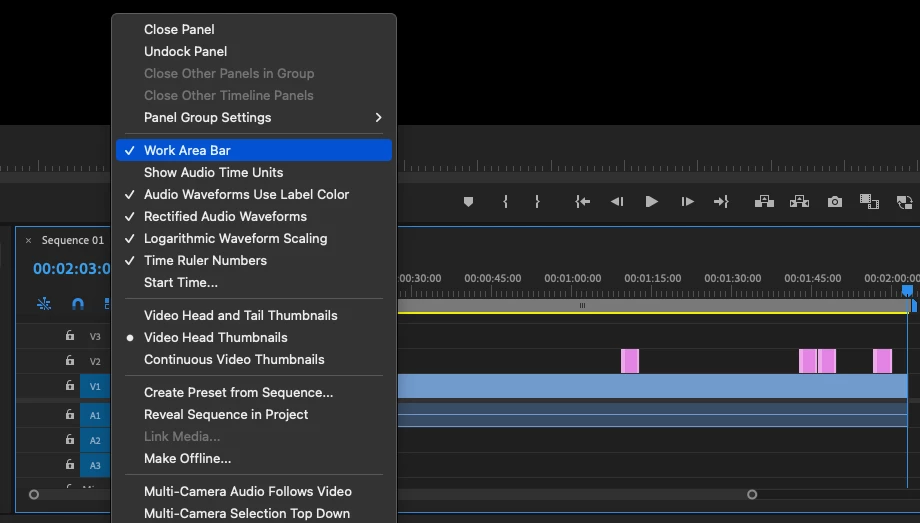
This value is needed by the API to send a render job to Adobe Media Encoder - so we know that the original user is up to something clever, and we are here for that kind of thing.
@Bruce Bullis and I made an example today of changing the work area in a sequence. Here is a screen recording with annotations, https://shared-assets.adobe.com/link/409e388d-b3cc-4392-7721-0288ba5d71a9 — and the code snippet we used is below. There is also a section on modifyWorkArea in the PPro Sample Panel on github
We hope some of you find it useful. Thanks for developing for Premiere Pro.
-Dan
var seq = app.project.activeSequence;
if (seq) {
    var currStateString = "undefined";
    var currState = seq.isWorkAreaEnabled();
    if (currState) {
        currStateString = "ON";
    } else {
        currStateString = "OFF";
        seq.setWorkAreaEnabled(true);
    }

    var oldIn 		= seq.getWorkAreaInPointAsTime();
    var oldOut 		= seq.getWorkAreaOutPointAsTime();
    var newIn 		= oldIn;
    var newOut 		= oldOut;
    var duration 	= oldOut.seconds	- oldIn.seconds;
    newIn.seconds 	= oldIn.seconds		+ 2;
    newOut.seconds 	= oldOut.seconds	- 2;

    seq.setWorkAreaInPoint(newIn.seconds);
    seq.setWorkAreaOutPoint(newOut.seconds);

    var doubleCheckIn = seq.getWorkAreaInPointAsTime();
    var doubleCheckOut = seq.getWorkAreaOutPointAsTime();
}
 AdChoices