Participant
April 11, 2022
Question

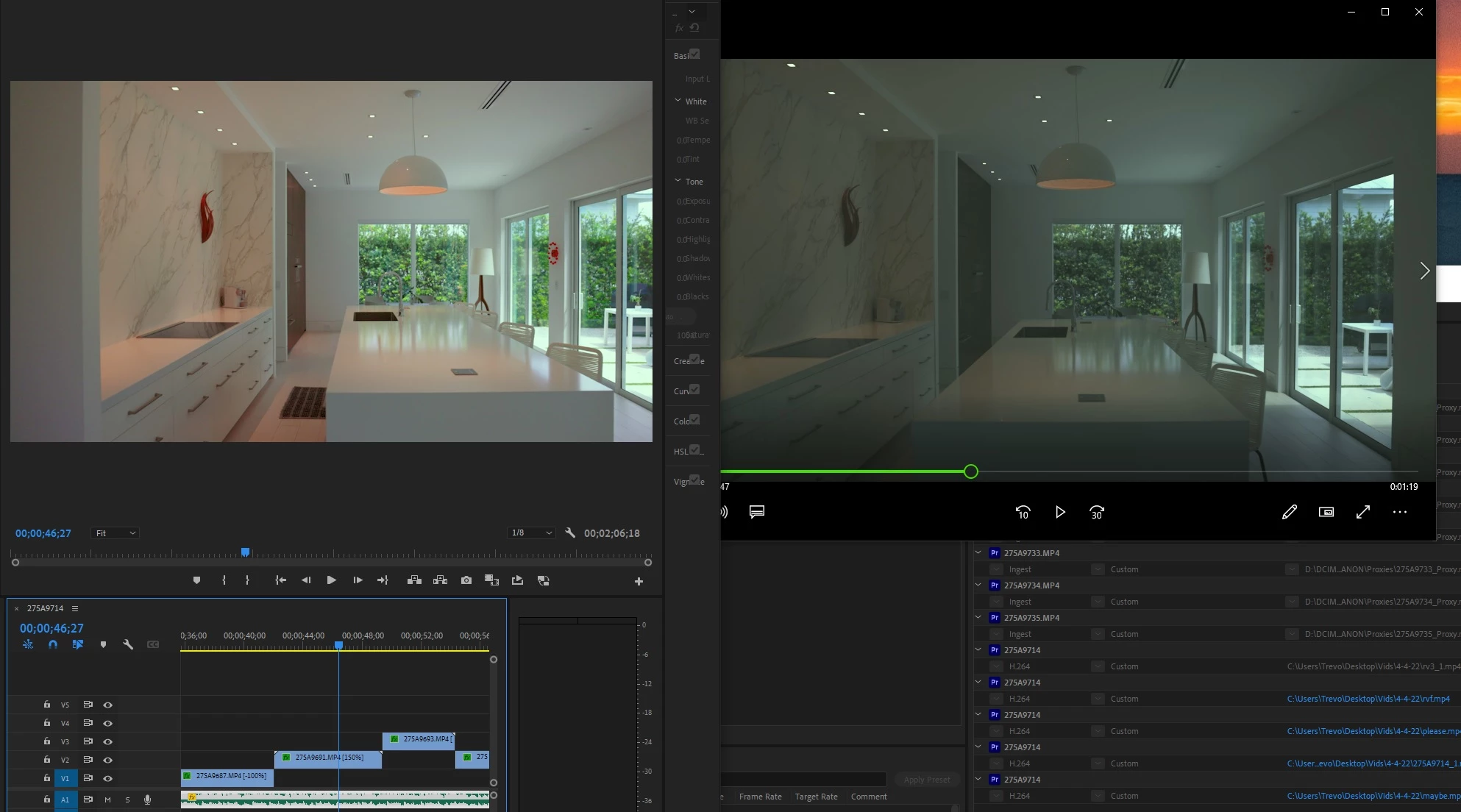
color and gamma shift after exporting

  • April 11, 2022
  • 1 reply
  • 788 views

I cant figure out why my color and gamma change from what I color corrected them to after exporting
This topic has been closed for replies.

1 reply

R Neil Haugen
Legend
April 11, 2022

That looks like Window's Media player?


What's your settings for your monitor? Are you running it in Rec.709, or HDR?


Do you have the Preferences option for Display color management checked?


And what is the color space of the media, and of the timline?


Neil

Everyone's mileage always varies ...
Participant
April 11, 2022

Yes it is


Not sure how to check but most likely HDR but not sure how that affects my exported video, they look different on the same screen


Yes 


The footage was shot with Clog-3 and was color corrected with a Rec.709 LUT

R Neil Haugen
Legend
April 11, 2022

If you don't know how to check and set for SDR/Rec.709 and HDR, well ... that's something you now have to learn. Premiere used to be a bog-stock Rec.709 app for color, from media defaults through timeline/display/exports.


It isn't any more, because the media isn't all Rec.709. And many deliverables will at some point need to be HDR ... which uses a different color space and dynamic range. Requiring different settings in the OS and monitor, typically.


HDR media has two differences from SDR/Rec.709 ... color space and dynamic range.


The color space/volume of HDR/Rec2100 is massive compared to the sRGB color range/volume of SDR. Far more hues and "deeper" saturation to the colors than sRGB allows.


And SDR/Rec.709 is limited to 100 nits of brightness ... where HDR "starts" at 400 nits, and most pro produced material is 1,000 nits or more.


So ... those are both massive differences, Premiere no longer guesses which you need, you have to tell it what to do. That's new with the Pr2022 series.


To check your media's color space/dynamic range ... go to the Project panel, and right-click your clips and select "Properties" ... which will tell you how Premiere 'reads' the metadata for your files for all sorts of things, including color space. Rec.709 is SDR, if you see HLG or PQ, those are both in HDR space.


To check your sequence color space/dynamic range, with the Timeline panel selected, go to the Sequence menu, Sequence Settings, and look for the color management options. It will show typically either Rec.709 (SDR) or HLG or PQ, again both of the latter being HDR.


You say your media is Clog-3, I assume that's Canon's log-3 form, right?


I'm more familiar with how Premiere is 'seeing' the Sony logs (and mis-reading them at times)so rather than making assumptions I'll ask questions.


If you simply drag a clip from the bin to a new sequence, is the image all blown out? Way over bright? Or is it the log-look of being gray?


What is Premiere showing in Clip Properties mentioned above for color space?


What is your sequence color space?


Where did you apply the C-log3 LUT?


And another question ... what preset did you use for export?


Neil

Everyone's mileage always varies ...