Participant
November 11, 2021
Question

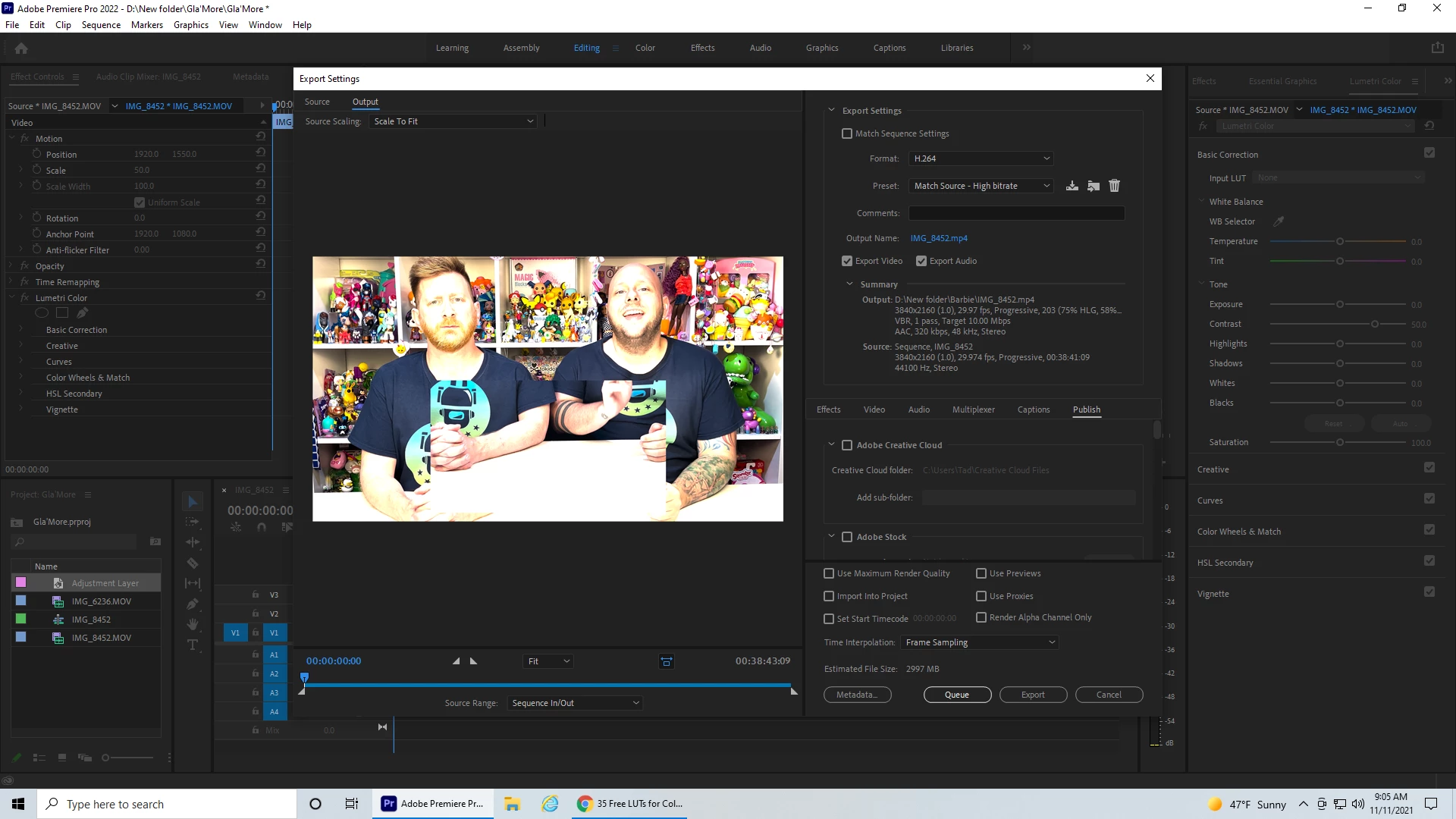
Color Distortion When Export

  • November 11, 2021
  • 3 replies
  • 3001 views

Everything seems to be working fine, although colors are a bit washed out in import. However, the major issue I have is when I go to export. Doesnt matter what color corrections I do, colors are extremely distorted. I havent changed any settings. I have searched for a correction, but cannot seem to find anything on this specific matter. Please help. 

P.S. Although I have been editing videos for a little over a year, I am still very new to video editing and only really use basic controls/features within Premiere. 


This topic has been closed for replies.

3 replies

Inspiring
November 14, 2021

I do not have the latest version of Premiere Pro so there might be a bug. That being said all NLE must be setup correct while editing and during export. All software programs like OBS, YouTube, Quicktime, Premiere Pro and iMovie will display video a tad bit different. The videos below might be helpful but then again Premiere Pro might have a serious bug this time because it seems like the alteration happens prior to rendering in the export viewer. That being said are you using any 3rd party plugins? 

R Neil Haugen
Legend
November 12, 2021

What created that original image file? And is it HLG or some other HDR form?


What are the Sequence settings for color in Premiere?


And in detail ... what export settings did you choose, as if this is an HLG or some other form of HDR, then the settings to properly export the file are very specific and tricky.


Neil

Everyone's mileage always varies ...
Participant
November 14, 2021

The original footage was recoreded on an iPhone 12 Pro Max. I made no color changes in Premiere (although in the past I have usually only ever had to change the contrast and exposure, but that was due to having a setting changed on the phone itself). 


I did not choose any export settings, aside from H.264. I also select "Use maximum render quality". On 11/5, there were no issues (last video that was edited prior to issue). Video appeared in export window same as actual footage and editing views within Premiere. On 11/8, the next time I attempted to edit a video, is when I noticed this change. No settings were changed. Only difference is as mentioned above, video colors are washed out on import and slightly over exposed. Like a bright but hazy day. When export window shows up, colors are blown out and distorted (as seen in the pictures). All settings are on default, aside form the format (H.264) which I have been using for almost two years. At first I thought it might have been an export window glithch and video would export as normal. But no, video looks just like the export preview shows. 

R Neil Haugen
Legend
November 14, 2021

You didn't answer whether that file is HLG or some other HDR format. Which is what it looks like Premeire is "seeing" it as.


Nor did you answer as to what the seqeunce settings are. I wasn't asking for the fun of it, but because the answers were needed.


Neil

Everyone's mileage always varies ...
Participant
November 12, 2021

This happened to me, too. So I reinstalled a previous version of Premiere Pro and my export worked just as it always had. It's frustrating to have to edit a video twice when the software won't work as it is expected to. I hope there is a resolution to this issue.