Participating Frequently
December 6, 2020
Answered

Color Grading

  • December 6, 2020
  • 2 replies
  • 892 views

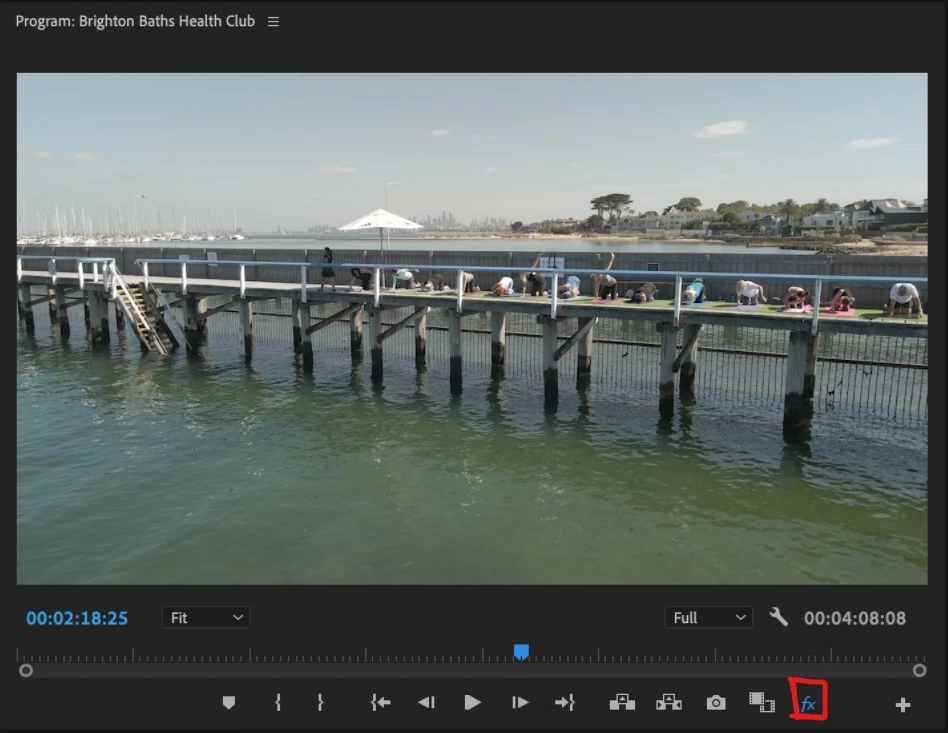
Each time I try to edit color it only happens in the Source window. It should happen in the Program window. This means it does not adhere to the final clip in the timeline for export. Does anyone know what I am doing wrong? Thanks in advance.
 

This topic has been closed for replies.
Correct answer Sami Succar

This fx needs to be off (grey).

2 replies

Participating Frequently
December 6, 2020

Participating Frequently
December 6, 2020

Thanks for your help.

Sami SuccarCorrect answer
Inspiring
December 6, 2020

This fx needs to be off (grey).

Brandon Loshe
Legend
December 6, 2020

Strange...are you color grading from under the master clip tab or the individual? I've had funky things happen when applying Lumetri Color under the master clip. For example, I would see the changes in the Source Panel, but a delay in the Program Panel. I had this issue in the 2019 versions. Curious - what version of Premiere Pro are you working on?

Participating Frequently
December 6, 2020
I have tried both Master and other. I cannot work it out. It basically
means I can't do any color adjustments.
Brandon Loshe
Legend
December 6, 2020

Hmm, are there any other effects applied in the Effect Controls Panel that could be causing conflicts?


Also, does it make a difference if you create an adjustment layer, copy the Lumetri effect from your clip, and paste it onto the adjustment layer? Do you see the color adjustments that way?