Participant
November 30, 2021
Answered

Color issues when export movie or frame

  • November 30, 2021
  • 1 reply
  • 362 views

Hey guys, i need some big help here.
I always used Premiere from 2016 till 2020 in the company´s account.
Recently i signed up for myself.


i normally edit videos from my wife´s iPhone (.mov) and i always draged images or other videos .mp4/h264 in the same timeline and never had an issue with the color. Never had any incompatibility in all these years.


i am facing 2 specific situations now, which i believe it´s related with any incompatibility because it is only happening on my .mov edits.


1. once i am editing a .mov file once i press ctrl + shif + e or try to export the video this is what i am getting, look like it´s has a 100% of exposure.. or any effect.
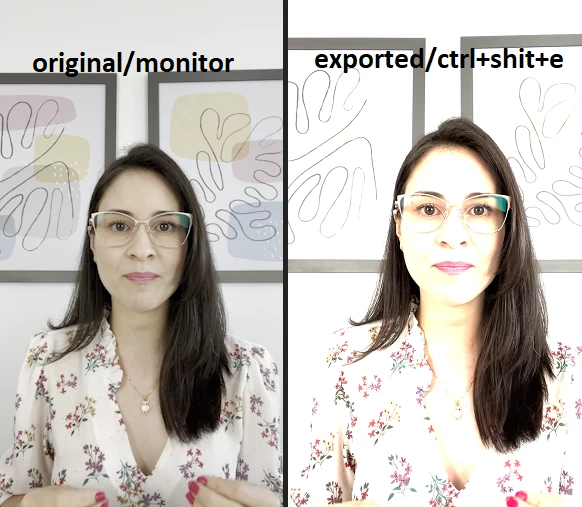
 

let´s say that i survive and don´t export the file, and start to add any other pictures in the same timelime..

instead of having a normal picture, it gets darker ,, like this,.

i really don´t know what to do.


If i do the oposite start the setup as a h264 mp4..  and them add a .mov, the .mov gets this full exposure color. i am using the same PC i always did.
even in my notebook the same issue is there, and started to happen once i signed up myself for thie annual signature.


Would someone help a desperate friend?
Intel(R) Core(TM) i7-4790 CPU @ 3.60GHz 3.60 GHz

GTX 980

16GB

Windows 10.

This topic has been closed for replies.
Correct answer R Neil Haugen

They have changed both the variety and scope of color management options for the users, and have changed default CM behaviors with many log and HGL/PQ format media types. It's confusing at first, but once you understand the options it gives us far more capablity to work with wider dynamic and color range media.


That said, I don't think the rollout was handled well. The options are spread all over and there's no one place to go in the app for information.


I created a lengthy FAQ for this forum that explains the changes, the process old and new, the media affected, and finally how to get color/tonal data within bounds. It's a bit of a read, but it does have examples, and it covers everything that has been changed.


Neil

FAQ: Premiere Pro 2022 Color Management for Log/RAW Media


1 reply

R Neil Haugen
R Neil HaugenCorrect answer
Legend
November 30, 2021

They have changed both the variety and scope of color management options for the users, and have changed default CM behaviors with many log and HGL/PQ format media types. It's confusing at first, but once you understand the options it gives us far more capablity to work with wider dynamic and color range media.


That said, I don't think the rollout was handled well. The options are spread all over and there's no one place to go in the app for information.


I created a lengthy FAQ for this forum that explains the changes, the process old and new, the media affected, and finally how to get color/tonal data within bounds. It's a bit of a read, but it does have examples, and it covers everything that has been changed.


Neil

FAQ: Premiere Pro 2022 Color Management for Log/RAW Media


Everyone's mileage always varies ...
Participant
November 30, 2021

Hey R Neil Haugen,


Thanks for your feedback, I can´t thank you enough.

I was struggling with that in these past few days.

Couldn´t find some good stuff like that in any place.


You did an amazing work!


R Neil Haugen
Legend
November 30, 2021

Thanks. I do try!


I was unfortunately not surprised when the troubles began for many users. I'd used the options in the public beta prior to their inclusion in the "shipping" version. And at the time, rather directly commented publicly and privately that a) the choices were needed, clearly ... but b) rolling them out piecemeal all over the app, and without CLEAR instructions to the users would cause plenty of problems.


As have happened.


If you've used the public beta, you know that beaker icon in the upper right corner of Premiere's main UI window? I've strongly suggested that icon should also be in the shipping version for users to check all changes ... including back over time. Sigh.


Neil


Everyone's mileage always varies ...