
Participant
August 29, 2025
Question

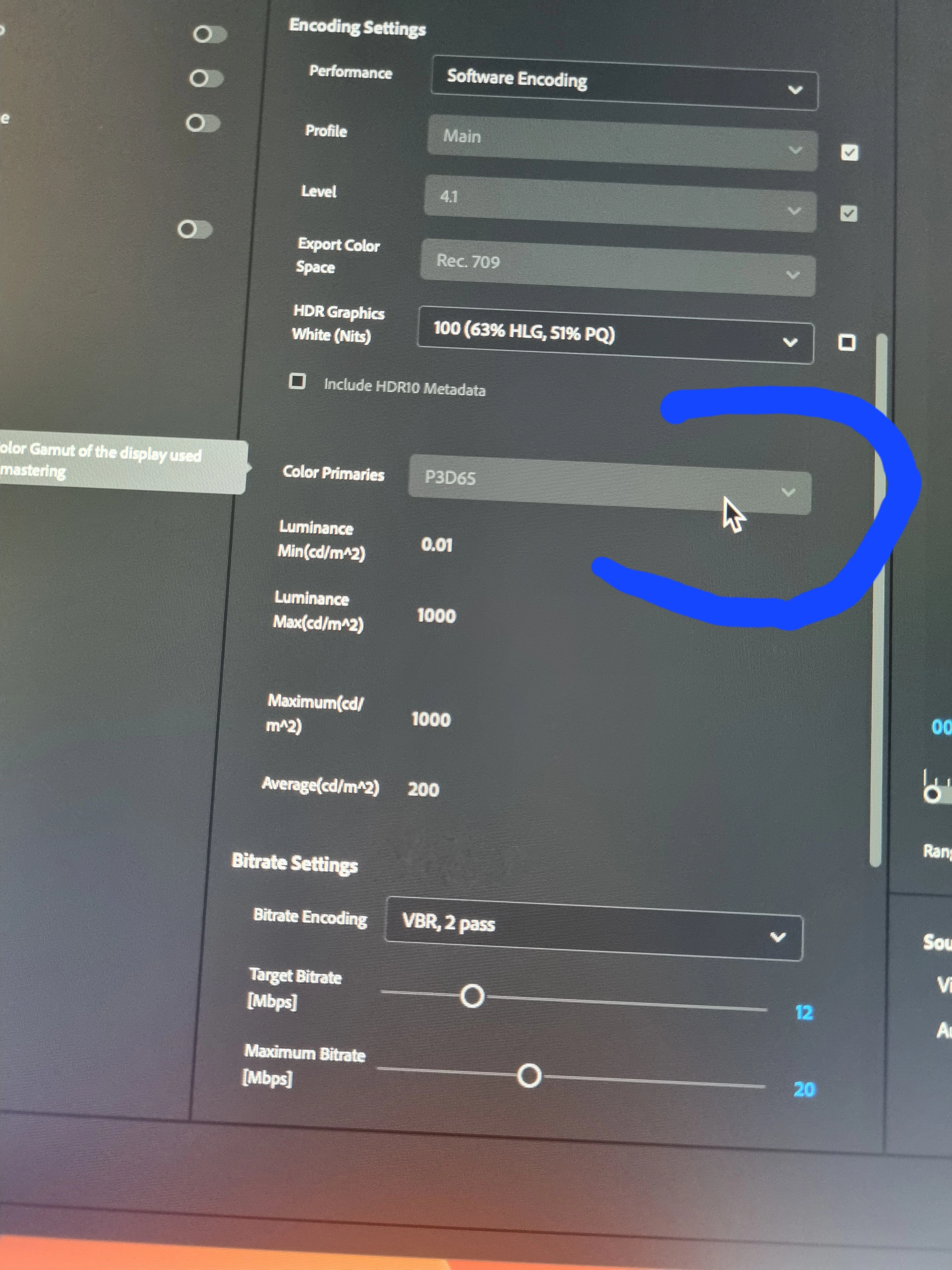
Color Primaries grayed out when exporting
  • August 29, 2025
  • 2 replies
  • 232 views

 Hello!

I have been trying to get access to the Color Primaries before exporting in Premire Pro, but this  is always grey out. I have tried many things but still I can't . I am trying to cuange it to rec 709 . If someone had the same issue or could give me a clue on how to get acces to it please. Thank you very much in advance 🙏

2 replies

R Neil Haugen
Legend
August 29, 2025

They will typically take the color primaries from the sequence, I think. Changing those in the export can be unpredictable.


So if you have a sequence that is PQ, or HLG ... duplicate the sequence, then change the color primary space of the duped sequence to Rec.709 in the Lumetri Settings tab, where all color management settings now reside.


Scrub through to see that your scopes and image stay within bounds, then export using any 'standard' preset that doesn't have HLG or PQ in the preset name, as those are all Rec.709.

Everyone's mileage always varies ...
Participant
August 29, 2025

Hey, thank you very  much for taking the time. I will look into that!!!!!!

Ishan Y
Inspiring
August 29, 2025

Hey Elvis,

Sorry for the trouble. That option will be available for Rec 2100 HLG or Rec 2100 PQ color spaces. The use case for this metadata is to match the color on an HDR display with the display used while mastering. If you're not exporting an HDR10 media, that medatada won't be required. Could you let me know why you need that metadata? We can look for other alternatives depending on your requirements.


Thanks,

Ishan

Please tag me (@) in your replies so that it notifies me and helps me respond promptly.
Participant
August 29, 2025

Hello!! Thank you for taking the time.

So basically it was a .mov , a screen recording from my screen, from a live session on touch designer. As I was using motion graphics,  I wanted to get the maxiquality possible when uploading  for

instagram reels.  This are my reading settings: Resolution: 1080×1920, Square Pixels


Frame Rate: 30 fps, Progressive


Color: Rec.709, HDR Graphics White 100


Encoding: Software


Bitrate: VBR 2-pass, Target 12–14 Mbps, Max 14–16 Mbps


Time Interpolation: Frame Blending


Render/Max Depth: Enabled.


However  it was only that aspect I thought it should be exported on rec 709 since it was going to be to Web.


So yes, that is my aim, to get the maximum quality possible on instagram, since my video was being washed out. I don't know if you have any suggestion when exporting regarding this subject. Thank you!