bbbigelow
Inspiring
June 22, 2018
Answered

Color Shift on Export

  • June 22, 2018
  • 2 replies
  • 23991 views

Hello,

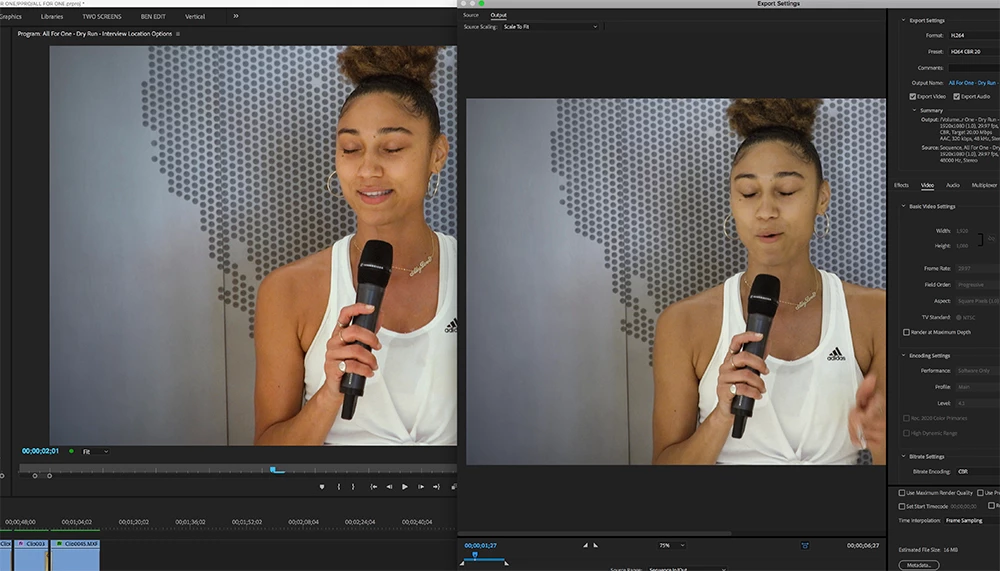
I'm using Lumitri Color on a clip. When I export it, the color does not match the program monitor.

Doesn't matter if I export h.264 or ProRes. Or if I export directly from the program, or with Media Encoder. The result is the same.

In the screenshot, the left window is the program monitor, the right is in adobe AME.

    Correct answer bbbigelow

    Yeah seems like a great monitor, once I can get it working!

    I set the monitor to BT709. Which immediately made everything much less saturated. Video inside of Premiere looks normal.

    But the mismatch is still present when I export out of premiere and view the QT file in Quicktime Player. It is properly saturated in Premiere, and undersaturated in QT player. But If I bring the QT file back into Premiere and view it in  the Source Monitor, it matches what I see in the sequence in the Program Monitor.

    Is there something I need to change in my system preferences? It looks like everything on my computer -- except what I'm seeing in the Program monitor in Premiere -- is much less saturated than it should be. The OS, webpages in Chrome, system icons, everything... unsaturated and darker than on any machine I remember using.

    It seems like Premiere is now letting the monitor handle the color properly, but everywhere else on my computer, including playing a video in Quicktime, is undersaturated.

    I'm running OS X Sierra 10.12.6

    Thank you!


    OK I think I got it!

    I set my Display Profile, in Color setting Display in System Preferences to "HD-709-A"

    This seemed to only effect the color outside of Premiere, meaning all other applications and OS X color, into a properly saturated space. So now video displayed in Program monitor, and in exports viewed in QT player, matches.

    On the HP monitor settings, (accessed directly via the monitor itself, not system prefs), its still set to BT709.

    Does this mean that: Premiere is bypassing the color profile assigned to OS X via System Preferences, and is sourcing its color profile directly from the monitor. And that by assigning a HD-709-A profile in system prefs, its properly saturating color in the rest of OS X, to match the wider gamut on the monitor?

    Does that make sense?

    Is HD-709-A the right choice to match the monitors BT709 profile?

    Thanks!

    2 replies

    Legend
    June 22, 2018

    I think Jamie LeJeune has it right in the following thread from the Blackmagic forums.  He's specifically talking about Resolve, but the idea holds true for all NLEs.  The upshot is, "The only image you can trust is to run SDI out to an accurately calibrated reference monitor."

    http://forum.blackmagicdesign.com/viewtopic.php?f=21&t=68410

    bbbigelow
    bbbigelowAuthor
    Inspiring
    June 22, 2018

    But this isn’t about color consistency between different screens.... I’m

    taking about within my own computer. It shouldnt be a tall ask, and require

    SDI hardware or whatever, to except that what I see in premiere is what I

    will get when what I export. The difference is massive in what I’m seeing.

    To try and get color to match from my screen to the millions of other

    Screen on the planet, yeah, that should be complicated.

    R Neil Haugen
    Legend
    June 23, 2018

    Even on your own computer you are dealing with apples and soccer stadiums. Until you understand what actually is going on, you will try every wrong thing in the book.

    Been there done that and wasted a lot of my time and others. So I try to help folks move past that.

    So you can just do your work, and *know* it will be correct.

    What color space is your monitor set to? Do you profile with a puck & software combo at least? What gamma does your monitor run natively? What white point?

    What color management is set in your OS?

    That's a start. And until you know that, and why it matters, you can't get control.

    Neil

    Everyone's mileage always varies ...
    R Neil Haugen
    Legend
    June 22, 2018

    First thing is go into Me's Preferences and uncheck "import sequences natively".

    Second, to check the export properly, check the "import into project" button in the PrPro export dialog,  and compare the sequence and the export in the Program monitor.

    Neil

    Everyone's mileage always varies ...
    bbbigelow
    bbbigelowAuthor
    Inspiring
    June 22, 2018

    Thanks Neil.

    So I brought back my exports into Premiere, and compared them in the program monitor, and they all match. Furthermore, the H264 export matches what I see in premiere when I open with VLC.

    But when I open with Quicktime, Quicktime 7, or upload to YouTube, viewing in Chrome, the color is shifted in the same way.

    I unchecked "import sequences natively", didn't seem to change anything.

    I'm using a new machine. I've never experienced this on other machines.

    bbbigelow
    bbbigelowAuthor
    Inspiring
    June 22, 2018

    I think I'm having this problem: CreativeCOW

    yikes.