



Color Theme Saved to "Libraries" is Visually Wrong Color Compared to HEX
I have a color theme that I use inside of Premiere Pro, to which I’ve imported to Libraries, that I use to quickly apply color variations to captions in Essental Graphics via eyedropper.
Typical behavior: When I have text highlighted, I hit the eyedropper icon next to Appearance > Fill inside the Essential Graphics panel and choose a color from my color theme.
Irregular behavior: I had a power outage blip, and since returning online with my computer, the color is now desaturated both visually, and when I use the eyedropper. It picks a completely different color than what the HEX code states. Meaning, the HEX is still correct, but the eyedropper does not choose that color.
It is like the Libraries tab is on a different color profile than the rest of the application. My yellow is #FFD800 where the HEX is correct still in the color profile, but eyedropper chooses #F9DA42 for some reason.
Any idea what’s going on here?
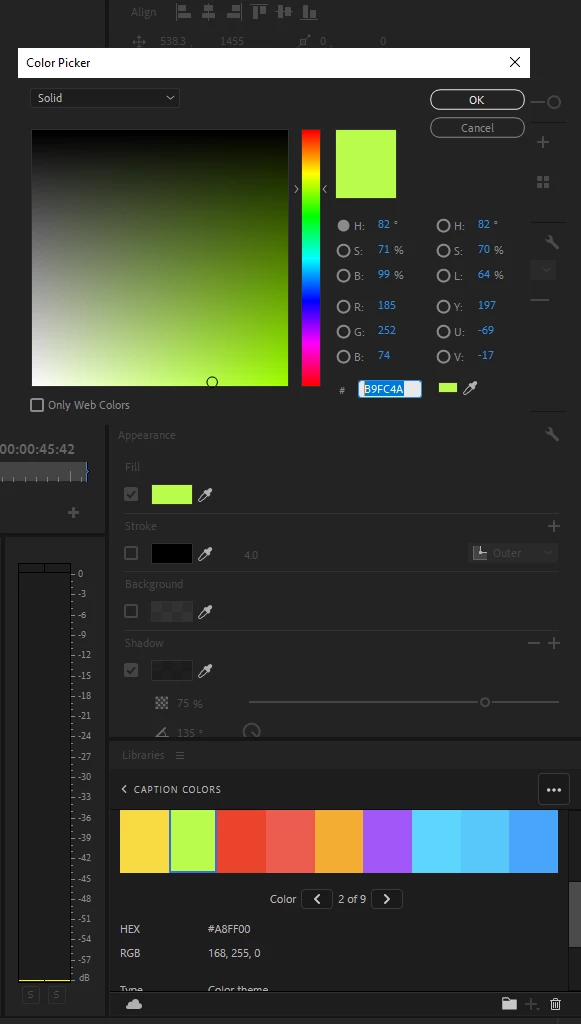
Issue with image:
Green is #A8FF00, but eyedropper from ‘Fill’ chooses #B9FC4A, so on so forth with other colors.
 AdChoices