
Colour grading export discrepancy - ProRes workflow
I am having issues with colour grading discrepancy while working in ProRes in Premiere CC 2015.4
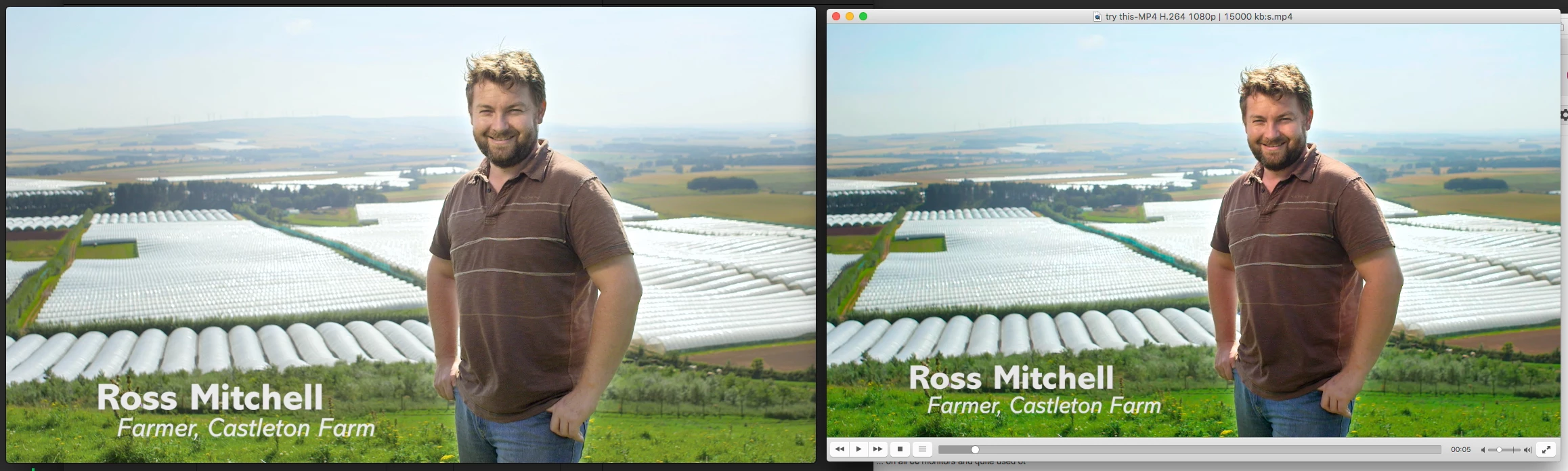
My footage is shot in ProRes 422 HQ, my timeline is setup in ProRes 422 HQ and after editing and grading in lumetri I am exporting to ProRes 422 HQ. When I review my exported files in quicktime there's a massive shift in contrast and saturation from what I see in the Program window in Premiere: my export has much less colour and contrast.
Weirdly when reviewing in VLC the exported file matches much better the graded shot in Premiere. Upload to web however and Vimeo shows me the ropey, washed out look Quicktime displays.
In the screenshot below the right is my export in VLC - looking kinda how I want it - and on the left is how it looks in Quicktime. And when I upload to the web. All washed out and shitty.
Adobe phone support may as well be a mobile strapped to a dog turd for all the help they don't give, and of obviously this is a right old bitch of a problem.
Anyone who can shine a light on this for me would be a diamond geezer for sure..
Cheers y'all
 AdChoices