joshie_
Participant
April 5, 2018
Answered

Colour Grading Issue - Exported videos dont match colours in Premiere Pro, chasing thoughts on the best export settings?

  • April 5, 2018
  • 1 reply
  • 689 views

I edit all videos on iMac4k and XPS 4K.
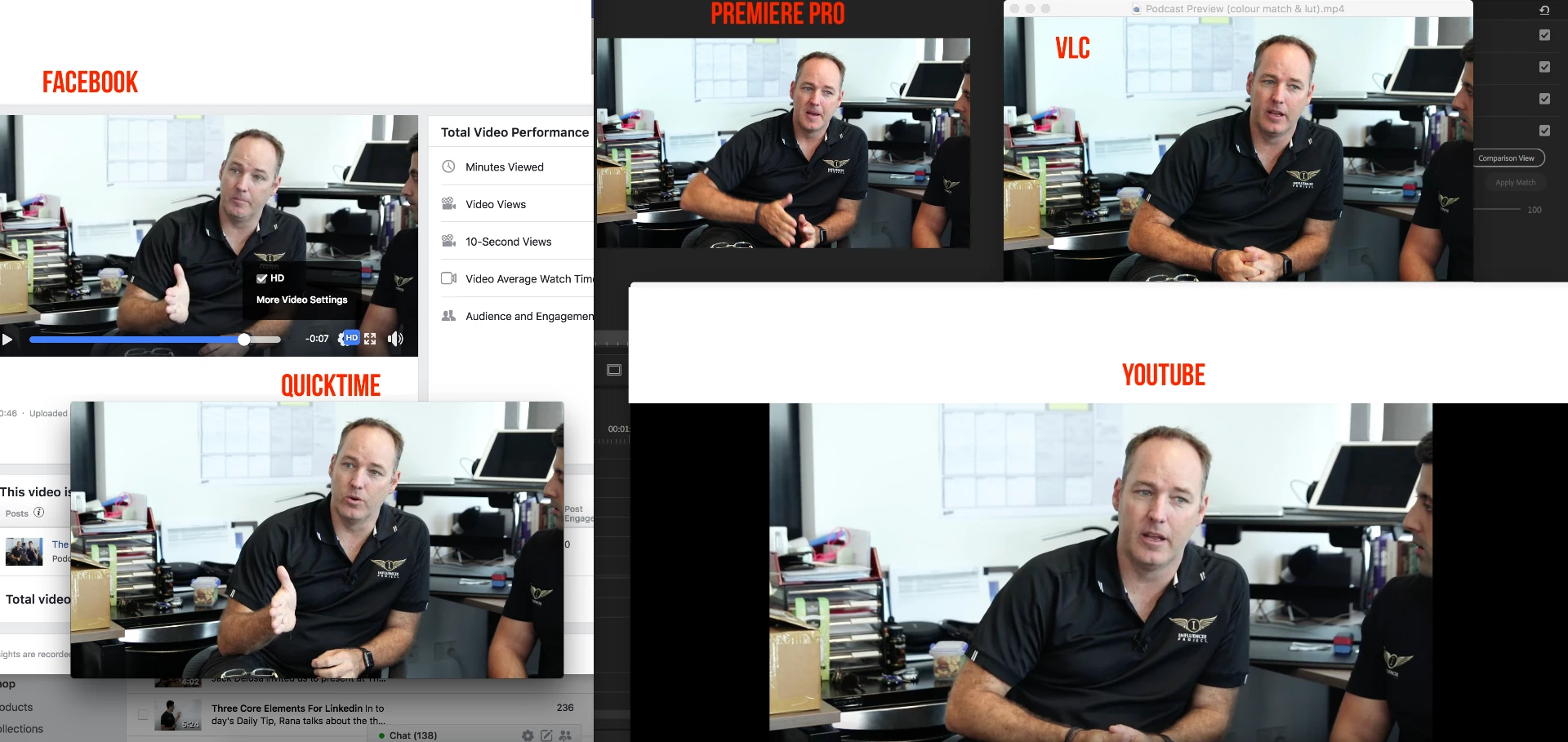
The videos I edit in premiere pro look very desaturated and lacking contrast when exported from premiere pro when played back in Quicktime or uploaded to social media platforms. The video matches Premiere Pro quite well when played in VLC however Facebook, Youtube and Quicktime look nothing like the Colour from Premiere Pro.

As social media is the main place where all videos are shown to the world Im curious on everyone's thoughts and export settings that people have found is the best settings when posting on social media?
This topic has been closed for replies.
Correct answer R Neil Haugen

Some people don't have this issue on upload to YouTube. Mine, for example, have ​always​ loaded up with proper value range and gamma. For many others, it's hit & miss. And for another large group, they ​never​ load correctly. Why? YouTube would know, but doesn't talk about it.

From some of the testing done by others and reported here, I think if we had the ability to set the color management issues and control therefore the 'flags' in the media exported, this would be manageable.

But ... as-is, now, if you use H.264, try the edit/save routine in YouTube, see if that fixes your ills when it forces the second re-encode step there. It has for many. Also ... as noted ... DNxHD/R uploads work, and do so without the value-range/gamma issue. They just take more bandwidth or time to upload. You may even get a slightly better image through the re-encode process on YouTube.

Neil

1 reply

R Neil Haugen
Legend
April 5, 2018

Both Quicktime Player and YouTube are famous for ... doing interesting things with the media.

Skip trying to get it looking good in QuickTime player, that's ... junk. Truly.

As to YouTube, first if you have the bandwidth speed, you can export in the DNxHD/R OP1a format/codec and almost always get a better quality upload through the system. For H.264/mov uploads, that's a crapshoot. Mine go through just fine, but for many, they don't. There is a way around this ... on initial upload, YouTube processes to a certain codec, then an hour or so later reprocesses to a different codec. For those whose uploads resemble QuickTime player, after uploading to your private channel, click the edit option button in YouTube for that video. Then save without doing anything.

In the next hour it should do the re-encode and get your media looking good. Also note that among browsers, Firefox is much better than Chrome for the accuracy of video display.

Neil

Everyone's mileage always varies ...
joshie_
joshie_Author
Participant
April 5, 2018

Hey Neil,


Thanks heaps for your response... Definitely has given me a couple of options to try and I will totally jump away from Quicktime.. Really appreciate your help.

H.264 is what I'm using and only because alot of people "recommend" it when creating content for social media. I'm also just curious if they do steps like oversaturate their projects in premiere pro on purpose as they know it'll change when uploaded? Or colour correct on a separate monitor? Or what steps they follow when having to upload to Facebook and other social media platforms.


Thanks again for your help legend...

R Neil Haugen
R Neil HaugenCorrect answer
Legend
April 5, 2018

Some people don't have this issue on upload to YouTube. Mine, for example, have ​always​ loaded up with proper value range and gamma. For many others, it's hit & miss. And for another large group, they ​never​ load correctly. Why? YouTube would know, but doesn't talk about it.

From some of the testing done by others and reported here, I think if we had the ability to set the color management issues and control therefore the 'flags' in the media exported, this would be manageable.

But ... as-is, now, if you use H.264, try the edit/save routine in YouTube, see if that fixes your ills when it forces the second re-encode step there. It has for many. Also ... as noted ... DNxHD/R uploads work, and do so without the value-range/gamma issue. They just take more bandwidth or time to upload. You may even get a slightly better image through the re-encode process on YouTube.

Neil

Everyone's mileage always varies ...