


Control surface encoders for x, y and z parameters of selected property in the effects control panel
I'm looking for more functionality from the Behringer X-Touch control surface and hope it is possible to bind inputs from the control surface encoder knobs at the top of the fader bank to x, y, and z values for a selected property in the effects control panel.
It is easy enough to map a single encoder to change a selected value, but I'd like to, for example, press the EQ button under Encoder Assign (red box, upper right), which will pre-select the first property in the Premiere Pro Effects Panel, unless a property is already selected; also, set the first three encoders on the X-Touch (8 encoders, yellow box) are bound to the x, (y, and z if there) values, and the fourth encoder is set up to navigate up and down the effects panel, choosing properties with x,y,z numeric values or a selection list. For fields with a selection list, if the x value encoder doesn't work, then the fifth encoder could be employed, leaving 6, 7 and 8 for future use.
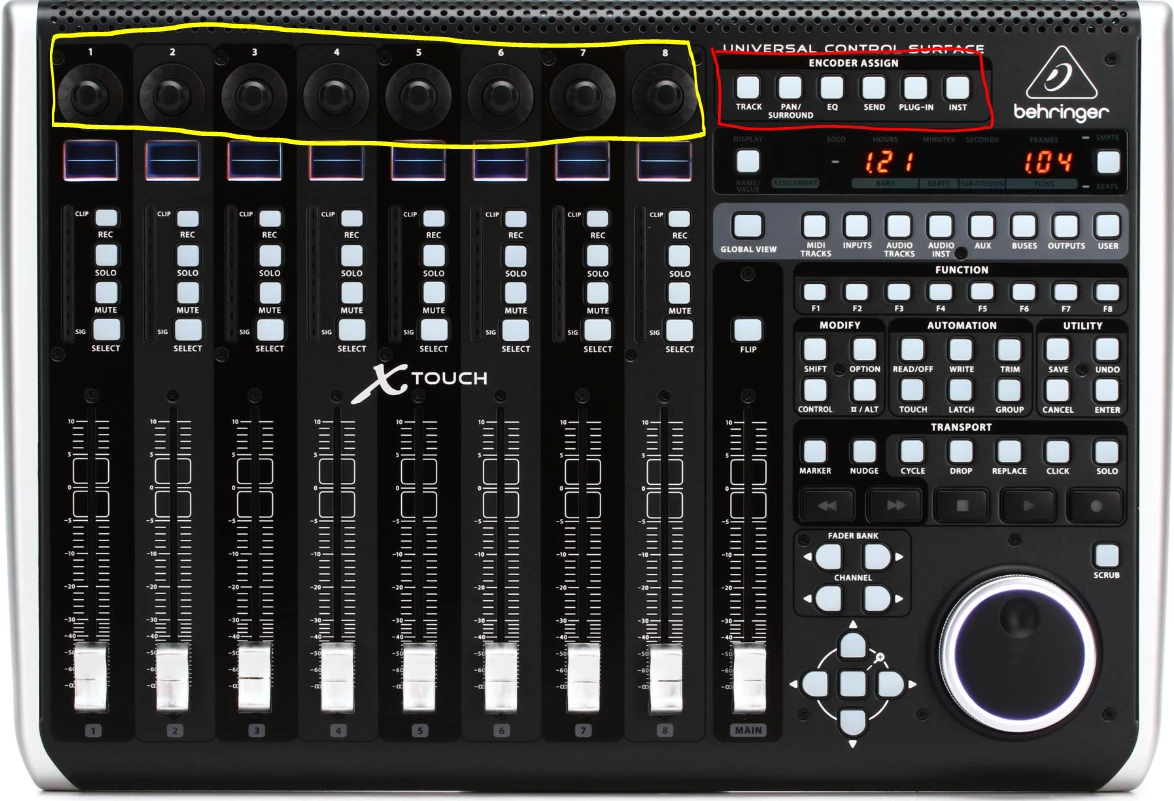
If other Encoder Assign banks (red box) could be accessed beyond EQ (that being Send, Plugin & Inst), then three more banks of 8 could be opened up for whatever - such as Lumetri controls or color selection.
Would a combination of Adobe ExtendScript and Bome Midi Translator Pro do the job? I use the Bome software to use the X-Touch as a DMX light control board, but could something similar be done to control the Effects Control Panel in Premiere Pro (and After Effects)?
This idea could work on other control surfaces, such as those used for live-streaming, or even the configurable/programmable touch-screen control surfaces for tablets.
 AdChoices