Cinema Físico
Inspiring
January 23, 2023
Answered

Copy and paste in timeline

  • January 23, 2023
  • 2 replies
  • 1403 views

Hello,


There is a bug when I try to copy and paste a clip in the timeline. 


I copy a clip in track 1 and want to paste it on track 2 or 3 or 4 and can't do it. When a paste it goes always to track 1. And I choose what track I want to paste my clip and it allways goes to track 1.


I am using Premiere Version 23.1.0 (Build 86). But it was happening also in the version before that.


Thanks a lot.
This topic has been closed for replies.
Correct answer MyerPj

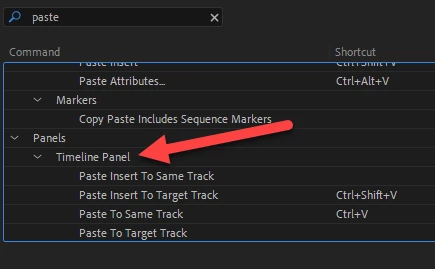
There are some new paste shortcut options. You'll probably want to change yours or assign a hotkey to one of the new timeline paste options.


2 replies

MyerPj
Community Expert
MyerPjCommunity ExpertCorrect answer
Community Expert
January 23, 2023

There are some new paste shortcut options. You'll probably want to change yours or assign a hotkey to one of the new timeline paste options.


Cinema Físico
Inspiring
January 24, 2023

Nice one, MyerPj. 

Thanks


Fernando AlvesEditor
R Neil Haugen
Legend
January 23, 2023

I think when you paste, you need to have that track selected and the original track deselected. It tends to use the lowest selected track.


Neil

Everyone's mileage always varies ...
Cinema Físico
Inspiring
January 23, 2023

Mr. Haugen,


Yes, I know. I select the track where I want to paste it and deselect the other ones. But it is not working. Now all my paste goes to first track.


Why? It doesn;t make any sense.

Fernando AlvesEditor