
alexr15862904
Participant
February 14, 2025
Answered

Copying footage from one project to another without importing folder structure

  • February 14, 2025
  • 1 reply
  • 486 views

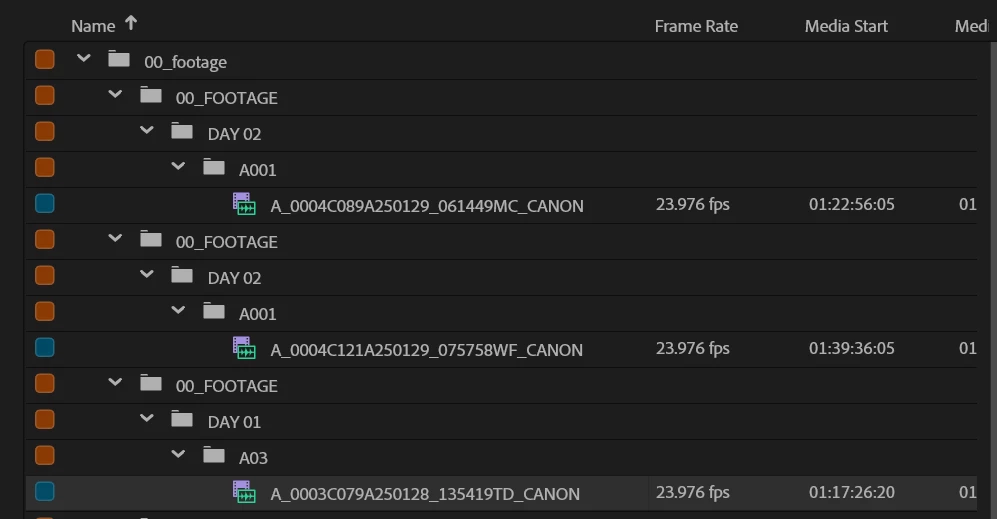
As the title says, I'm trying to figure out how to copy footage from one project to another without bringing the folder structure with it. As I copy clips from one project timeline to another project timeline, I end up with all of these extra folders. Is it possible to disable this?
 

Correct answer Kevin-Monahan

Hi @alexr15862904,

Thanks for the message. Welcome to the forum. You can Ctrl (WIN) or CMD (macOS) click each one. Then once these are selected, copy the clips. In the new project, paste the clips into the Project panel. That should work. You can also drag them into the other project directly. 


You could also right-click a single clip and choose "Reveal in Finder." Once the media file is revealed, all the files can be found. Select them and import them into the new project. That should also work.


I hope the advice helps you.


Thanks,
Kevin

1 reply

Kevin-Monahan
Community Manager
Kevin-MonahanCommunity ManagerCorrect answer
Community Manager
February 14, 2025

Hi @alexr15862904,

Thanks for the message. Welcome to the forum. You can Ctrl (WIN) or CMD (macOS) click each one. Then once these are selected, copy the clips. In the new project, paste the clips into the Project panel. That should work. You can also drag them into the other project directly. 


You could also right-click a single clip and choose "Reveal in Finder." Once the media file is revealed, all the files can be found. Select them and import them into the new project. That should also work.


I hope the advice helps you.


Thanks,
Kevin

Kevin Monahan - Sr. Community & Engagement Strategist – Pro Video and Audio
Participant
February 14, 2025

Great, thanks!