

Participant
July 24, 2025
Answered

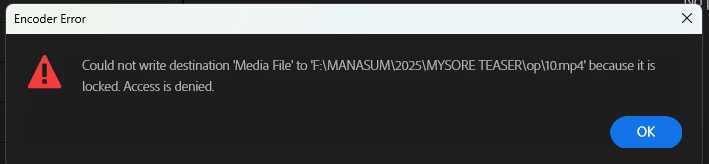
could not render my premiere project file
  • July 24, 2025
  • 2 replies
  • 134 views

hi..

i am using premiere pro 2025 version

it is not leting my file to render, it is showing above message when export

Correct answer Sumeet_Kumar_Choubey

Hi Shylendra,


Welcome to the community! Please check if you have read & write permission on the drive where you are trying to render/export. Alternatively, you may try rendering/exporting to the internal storage or the user directory, where you have read and write permissions, to see if it exports properly.


Thanks,

Sumeet

2 replies

kglad
Community Expert
Community Expert
July 24, 2025

in the future, to find the best place to post your message, use the list here, https://community.adobe.com/

p.s. i don't think the adobe website, and forums in particular, are easy to navigate, so don't spend a lot of time searching that forum list. do your best and we'll move the post (like this one has already been moved) if it helps you get responses.


<"moved from cc desktop">


Sumeet_Kumar_ChoubeyCommunity ManagerCorrect answer
Community Manager
July 24, 2025

Hi Shylendra,


Welcome to the community! Please check if you have read & write permission on the drive where you are trying to render/export. Alternatively, you may try rendering/exporting to the internal storage or the user directory, where you have read and write permissions, to see if it exports properly.


Thanks,

Sumeet