Inspiring
December 19, 2016
Answered

Counting Cuts in Premiere Tutorial/Question

  • December 19, 2016
  • 3 replies
  • 7391 views

To those who have the Adobe CC.

Throughout the last several years I have heard in the industry, editors pass on their 'bragging rights' to the amount of cuts they have made in their final project.

Thrilled, I wasn't quite sure how to do this in Premiere. Count my cuts/edits until I tested out a theory this morning.

I tested it out on a few edits and it seems to work. Please, anyone correct me if I'm wrong on this. I dont suposse this would include nested sequences or linked comps from adobe after effects.

Export your sequence to a Final Cut Pro XML file.

Open in Adobe Dreamweaver. Automatically Dreamweaver groups the starting and ending tags in the file. I easily saw how the XML file was composed into groups.

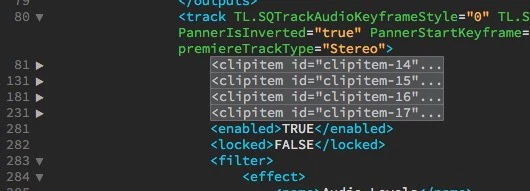
I collapsed everything until the <track...> and then it listed several point blank <clipitem...>. This would be the clips in the sequence.

Now all that you need to do is cound inbetween the line numbers for "<clipitem" within Dreamweaver 
    Correct answer Ann Bens

    Select clips and open the Info Panel.

    3 replies

    Participant
    February 7, 2024

    Woah, cool! Wanna share mine since I just posted this elsewhere to help someone


    ... wait OMG just realized this post was from 2009!


    Anyways, what I did: 

    Step #1. On Metadata Display, search then checkmark "Video Usage".

    Step#2. In timeline, nest the edit to be counted so that it becomes one clip, then apply Scene Edit Detection. 


    Voila, the Video Usage metadata will tell you the number of times that one clip occures in the timeline, equals the number of cuts you did on the actual edit.

    .


    Participant
    February 16, 2024

    Just got through an hour and a half interview and I was curious about how many cuts I made to just make the interview sound CLEAN. This tip helped me figure out how many, "So, Ya Knows, Umms, Ahhs, and Likes" I cut out of this thing. 

    Ann Bens
    Community Expert
    Ann BensCommunity ExpertCorrect answer
    Community Expert
    February 17, 2024

    Select clips and open the Info Panel.

    Legend
    December 19, 2016

    I have heard in the industry, editors pass on their 'bragging rights' to the amount of cuts they have made in their final project.

    That's...like bragging about how many times you changed the lens during a shoot, or how often you turned a light on and off.

    Utterly meaningless.

    Participant
    January 23, 2021

    This would be very useful for me. I am making a cut where most shots will have VFX in them. It will be helpful to have a shot number embedded in each cut for VFX numbering purposes. 

    Community Expert
    December 19, 2016

    Try exporting an EDL and opening in Excel.

    Inspiring
    December 19, 2016

    I don't see to export multiple tracks to EDL? My current edit is using 12 tracks