
Participant
April 11, 2024
Question

Crash during export

  • April 11, 2024
  • 1 reply
  • 438 views

Hello,

Im trying to export a 4k video but premire pro 2024 keeps crashingat random spots during rendering.  I've tried all different export settings.  Here are my system specs: 


Processor 13th Gen Intel(R) Core(TM) i9-13900K 3.00 GHz
Installed RAM 64.0 GB (63.7 GB usable)
System type 64-bit operating system, x64-based processor
GPU: Nvidia Asus Tuf 4080
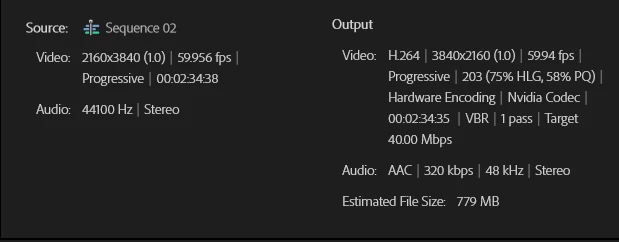


keeps crashing during export.  

This topic has been closed for replies.

1 reply

R Neil Haugen
Legend
April 11, 2024

The fps of the sequence ... 59.956 ... ain't no normal fps. Is that a VFR ... variable frame rate ... clip perchance?


As Premiere doesn't always handle VFR well. 

Everyone's mileage always varies ...
Participant
April 11, 2024

yes, it was shot on a iphone 15

Peru Bob
Community Expert
Community Expert
April 11, 2024

Many users are having issues with VFR. If the file is variable frame rate, use Handbrake to convert to constant frame rate before importing into Premiere Pro:
https://handbrake.fr/downloads.php
Here is a tutorial:
https://www.youtube.com/watch?time_continue=34&v=xlvxgVREX-Y

Shutter Encoder may also be used to convert to Constant Frame Rate:
https://www.shutterencoder.com/en/