
Inspiring
June 25, 2023
Question

Create discrete captions for separate audio tracks

  • June 25, 2023
  • 2 replies
  • 1333 views

I'm trying to create two discrete caption/subtitle tracks from two audio tracks. I'm able to get one track to work, but when I try to create the second captions track on the second audio file, a Lock icon is shown with the message: "Caption file is in source preview mode and must be added to sequence to be editable." 
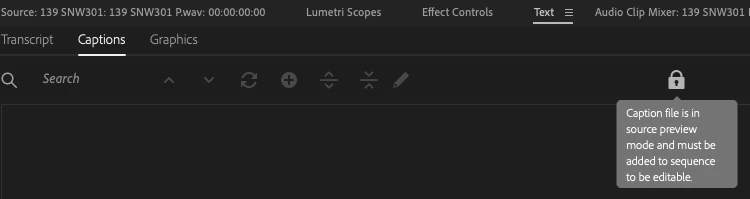
 

I don't understand this message because the audio file in question is added to the sequence. I double checked it's added by double-clicking the audio region and selecting the "Text" tab in the editor, which is where I get the Lock icon and message.


I've seen other uses successfully accomplish my goal, I'm just not sure how.

This topic has been closed for replies.

2 replies

Participant
February 19, 2024

I am also having this issue. It transcribed the sequence but didn't create captions for one of the audio sources. Anyone figured out how to get this to work? 

Participant
February 19, 2024

I got rid of the lock icon by closing the Source window. But it didn't solve the issue of the missing captions. 

Participant
April 12, 2024

on the text monitor, look for the botton "show program monitor transcript" or shift x. Also I put the background music I had on a muted audiotrack. Hope this helps

Participant
December 6, 2023

Were you able to figure this out? I am having the same issue.