
Inspiring
May 4, 2022
Answered

'Create new project' import tab not showing all folders to select media

  • May 4, 2022
  • 3 replies
  • 2230 views

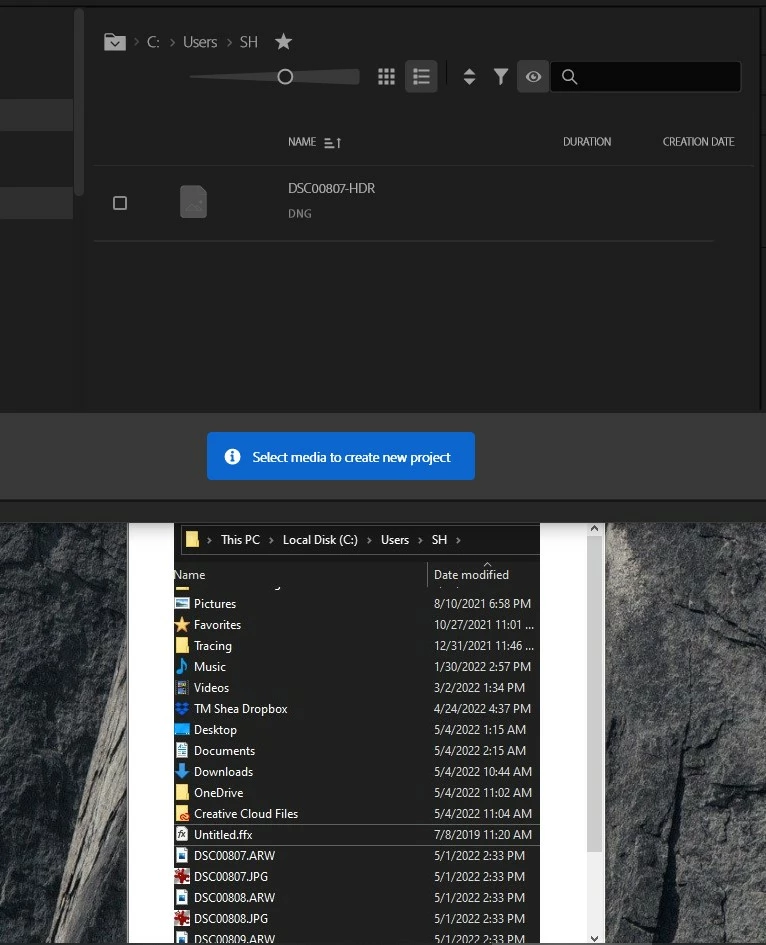
When trying to create a new project using the new dialog box, I navigate to my normal directory (C:\user\SH\) to import media and instead of seeing all my files and folders, I only see one .DNG file.  There should be 10+ folders and several .DNG, .JPG, .ARW, etc. files.  Going to another path  (C:\user\Public\) and it works fine. Using Win10.  Similar path on my Win11 laptop works fine too.
This topic has been closed for replies.
Correct answer Stan Jones

Steve, so glad you asked! This has been plaguing me for several versionsm and I never get around to asking. Once upon a time, I changed the "change file types" in Media Browser (the Eyeball/"Directory Viewers"), to dng. Thereafter, even after resetting preferences etc, it ALWAYS opens with the dng set. So it only shows me dng files. As soon as I reset it to "Files," I can see all the files. And I am good until I close PR. When I reopen it, I'm back to dng only.


And this setting has now followed me to the new project style, the new Import tab, etc.


In any event, Steve, just click on the eyeball and select "Files."


Can anyone tell me how to set the default back to all files?


Stan 

3 replies

Stan Jones
Community Expert
Stan JonesCommunity ExpertCorrect answer
Community Expert
May 4, 2022

Steve, so glad you asked! This has been plaguing me for several versionsm and I never get around to asking. Once upon a time, I changed the "change file types" in Media Browser (the Eyeball/"Directory Viewers"), to dng. Thereafter, even after resetting preferences etc, it ALWAYS opens with the dng set. So it only shows me dng files. As soon as I reset it to "Files," I can see all the files. And I am good until I close PR. When I reopen it, I'm back to dng only.


And this setting has now followed me to the new project style, the new Import tab, etc.


In any event, Steve, just click on the eyeball and select "Files."


Can anyone tell me how to set the default back to all files?


Stan 

Steve221Author
Inspiring
May 4, 2022

That was it.  Filtered to DNG but not identified in eyeball icon.

R Neil Haugen
Legend
May 4, 2022

Also, you can easily skip importing on that page.


Just make sure nothing is 'starred' in the center import section, nothing blue in the right side options, then ...


1 Type Project Name

2 Select Project Location

3 Click the "Create" button


Now your project opens, go to the Project panel or MediaBrowser panels to import as you probably have in the past.


Neil

Everyone's mileage always varies ...
Ann Bens
Community Expert
Community Expert
May 4, 2022

Best is to put your assets in a separate A/V folder, preferably on another internal drive.