

Randune23
Inspiring
August 4, 2023
Question

Creative Cloud changes

  • August 4, 2023
  • 2 replies
  • 600 views

Okay, as I have been working on a HUGE project in Premiere Pro, it kept giving me the mpeg error.  So I went to Creative Cloud to see if there was an update to fix this nasty bug.  And that's when I about lost my ****!  As I am looking at the apps page, I noticed something strange...
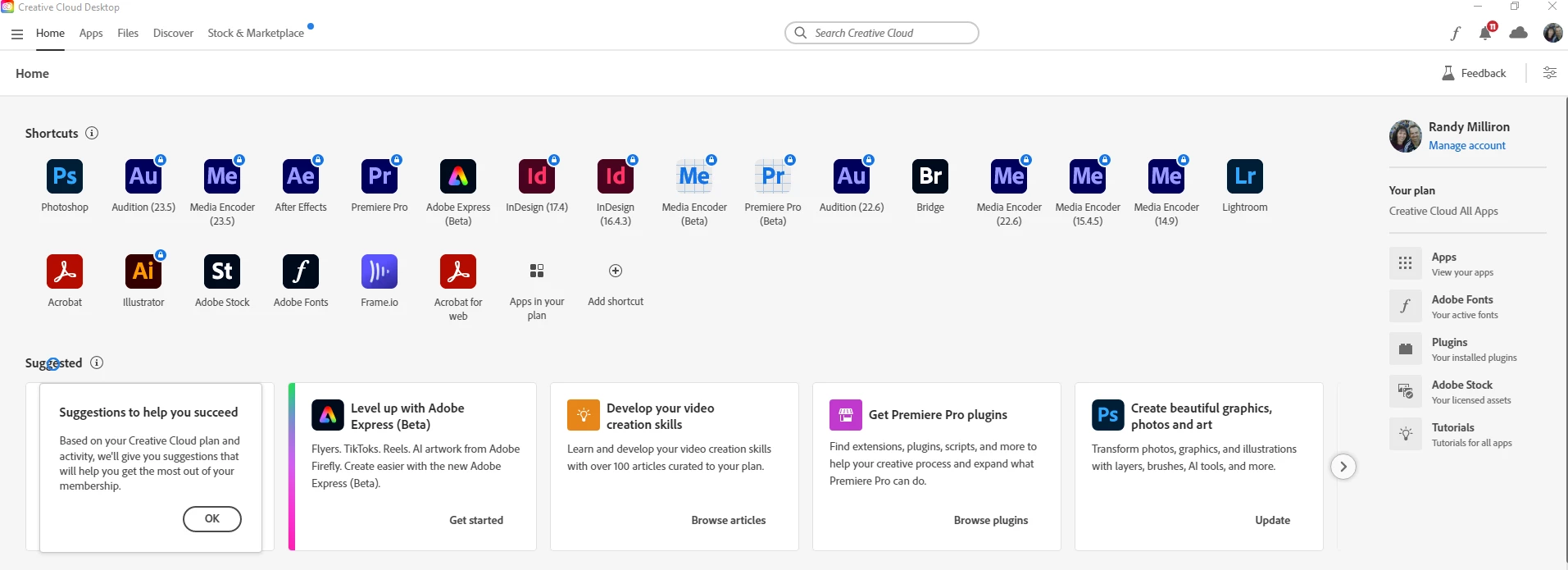
 

Most of the apps I use as a monthly Creative Cloud member have a LOCK above the icon.  When did Adobe change its plan???  I'm still able to open up and work (for a short while) in PP before it keeps giving me the same error.


Is this legitimate?  Why and when did Adobe decide to change its plans?


Any feedback is greatly appreciated.  I have been a CC member since the platform launched and am very concerned about this issue.


Randy

This topic has been closed for replies.

2 replies

Ann Bens
Community Expert
Community Expert
August 4, 2023

You need to open the CC Desktop app on your computer for updates not CC desktop on the website.

Randune23
Randune23Author
Inspiring
August 12, 2023

Yeah, I don't know what was going on. I opened up CC from the taskbar (Windows 10) and that's what displayed. I rebooted and it was still like that. Then a little while later it just mysteriously removed the locks. ¯\_(ツ)_/¯ 

kglad
Community Expert
Community Expert
August 4, 2023

<moved from cc services>

Remote Index
Inspiring
August 4, 2023

@kglad


Why is this forum question - about CC services - moved from CC services?


R.

kglad
Community Expert
Community Expert
August 4, 2023

because you had a problem with premiere pro that i thought was more pressing than the lock icon question.  but if you want your message moved back to cc services, i will do that.  let me know.