Participant
October 19, 2022
Question

Crop Button Not Dropping onto Video

  • October 19, 2022
  • 2 replies
  • 322 views

Hello, 

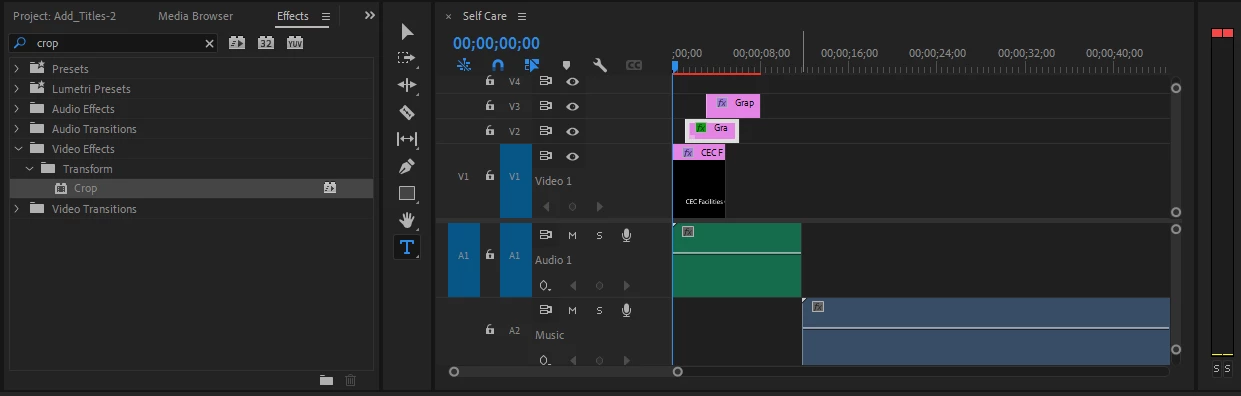
I'm new to Premiere Pro. I tried to drop the Crop button onto the blue line as that's the video I want to crop, but it won't drop. I'm not sure what I'm doing wrong.  Any help would be appreciated. Thanks


This topic has been closed for replies.

2 replies

Ann Bens
Community Expert
Community Expert
October 19, 2022


R Neil Haugen
Legend
October 19, 2022

Drag the crop icon to the middle of the clip on V1 ... then it will be placed on it, and you use the settings in the Effects Control Panel for that effect to set the cropping.


Neil

Everyone's mileage always varies ...
Participant
October 19, 2022

Thanks Neil. I did what do said. It let me select the blue line. I was able to trim the video which I did need to do that. However it never showed the actual video so I could crop it. Also when I selected the blue line, it actually did not then provide any cropping tools under the Essential Graphics on the right side of the screen. Am I dropping the Crop button possibly in the wrong place?       It let's me drop the button on everything else except the green and blue lines.

Ann Bens
Community Expert
Community Expert
October 19, 2022

Might want to start with the Learn tab when opening Premiere first.

You are making 3 different mistakes in one go.

You need to learn the basics first.