Participating Frequently
September 18, 2018
Answered

Crop to Project Aspect Ratio

  • September 18, 2018
  • 1 reply
  • 639 views

Hi all,

I recently got some 16mm footage telecine'ed. I'm trying to edit the DNxHD files in premiere, and am having some trouble with aspect ratios.

The files I got back include the film edge, so I'll need to crop to get a clean image. The problem is that the telecine includes the native 16mm 1.66 frame within a larger 1.78 file, and for some reason Premiere only lets me crop to the source file's aspect ratio. I've tried creating a 1.66 sequence, but without luck.

Is anyone aware of a workaround? It seems strange that one can't crop to specific aspect ratios - I know this feature is available in other Adobe software, such as Camera Raw.

Thanks in advance.
This topic has been closed for replies.
Correct answer Meg The Dog

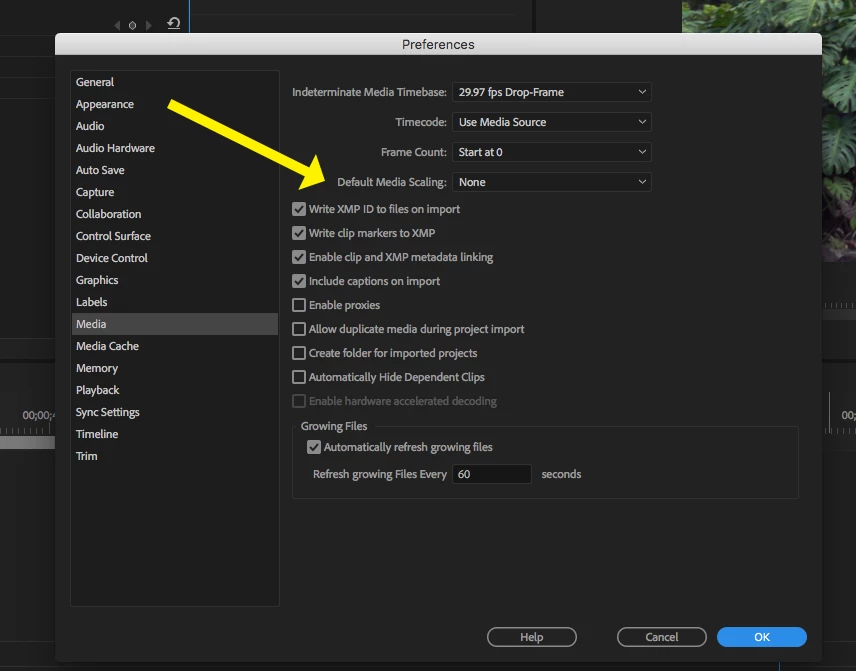
If you really and truly want to edit at the 16mm aspect ratio, then create the empty sequence with that specification and go to Media > Default Media Scaling and set it to None.

Now when you edit source material to the timeline, it should fill that frame without the black borders.

MtD

1 reply

Meg The DogCorrect answer
Inspiring
September 18, 2018

If you really and truly want to edit at the 16mm aspect ratio, then create the empty sequence with that specification and go to Media > Default Media Scaling and set it to None.

Now when you edit source material to the timeline, it should fill that frame without the black borders.

MtD