
david dt41184977
Participant
May 22, 2017
Answered

Cross Dissolve going to black and then cutting to new clip...

  • May 22, 2017
  • 1 reply
  • 8100 views

I'm having a strange issue with PP.  I'm editing a dance, and am using simple cross dissolves to switch between cameras.  Most of the transitions are working, but there are a couple transitions that are dipping to black and then playing the next clip, not crossing at all.

Has this happened to anyone else?  Any fixes?  Reasons this is happening?

Thanks,

D
This topic has been closed for replies.
Correct answer Meg The Dog

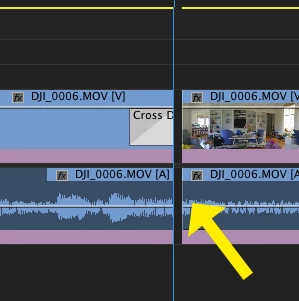
If you zoom in on your timeline at the point of the bad transition, it is likely you have a frame of black between the two clips:

MtD

1 reply

Meg The DogCorrect answer
Inspiring
May 22, 2017

If you zoom in on your timeline at the point of the bad transition, it is likely you have a frame of black between the two clips:

MtD

david dt41184977
Participant
May 22, 2017

I was about to type that it didn't work... and then I had a thought... which might have been what you were saying in the beginning...

There were no gaps in between clips, BUT, it did happen where one camera created a second clip.  So despite the fact that I synced both cameras, and the video runs on with no stops, the actual video file is two separate files.  Whether you answered my question or not, your answer led me into the right direction!

Thanks!

September 2, 2017

Hello,

I think I have the same problem, but do not yet understand the solution.

I  have a multi-camera project, with many cross dissolves. Some of them act like a dip to black after exporting the movie.

Can you explain what you mean with a second clip, and how you fixed it?
Would really help me out!