
Cross dissolve is too bright with a low-opacity clip, MRQ, and disabled Linear Color
I've come across what seems like a bug. Without Linear Color and with Maximum Render Quality (MRQ), a cross dissolve on a clip with 15% opacity renders at much greater opacity or brightness than 15%. That is, on the start of the clip, it dissolves up to a much higher brightness, but when the dissolve ends, the clip drops to its expected brightness.
Here's a contrived example, with a cross dissolve on a white-on-clear bitmap clip (the angular line art) whose opacity is set to 15% opacity and normal blend mode:
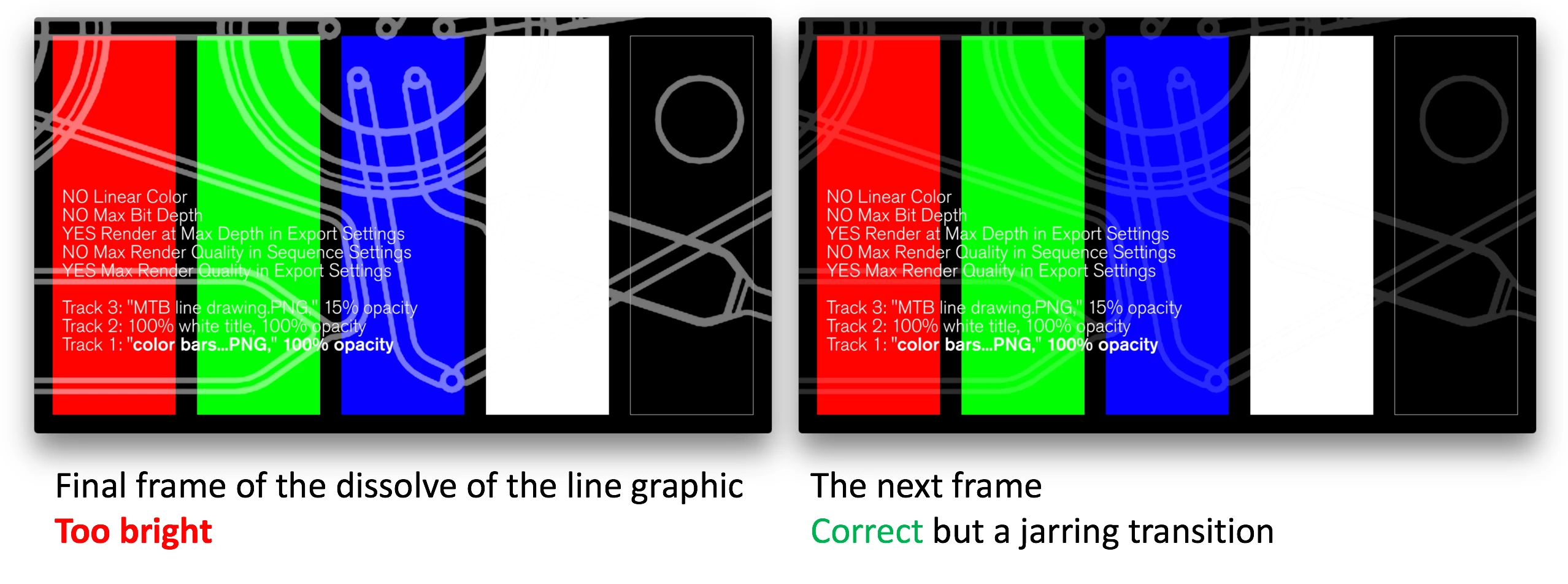
What's really weird is that this bug occurs with certain underlying tracks but not with others. Over a white-on-clear PNG, the bug does not occur; over a PNG of color bars, it does occur. By doing both in one sequence, I exported a single video exhibiting both behaviors. For comparison, here's the same sequence when MRQ export was turned off, which looks right. (As you might guess, it also behaves this way in my real project, unfortunately.) Here's the complete little project.
I know I can turn MRQ off to avoid this, but MRQ does things I like for at least some exports. Regardless, a cross dissolve should never act like this, right?
If it's dangerous to disable Linear Color and enable MRQ, it would be nice of the program to warn us of that and nicer for it to explain the known issues with it. My understanding is that Adobe has no help files at all for Linear Color. I've read some of the helpful threads here cautioning about these and other settings, but I haven't figured out the safe combinations. Can you help me with that?
Thanks,
Wallace
Setup
I haven't tested every combination of settings, but where I did try a setting both ways, I've noted that here.
Sequence settings:
1920x1080 59.94 fps progressive
Composite in Linear Color: no (I prefer this so that my partial-opacity clips and title elements export as they are shown in Preview and Titler; otherwise they export much brighter or with higher gamma)
Maximum Render Quality: yes or no (the bug occurs either way, as you'd expect, but I tested just to be sure)
Maximum Bit Depth: no (haven't tried changing to yes)
Export Media settings:
h.264 high bitrate (haven't tried others)
Render at Maximum Depth: yes or no (the bug occurs either way)
Use Maximum Render Quality: yes (if set to no, the bug does not occur)
Queue (to Adobe Media Encoder AME)
AME settings:
Renderer Mercury Playback Engine (MPE): GPU Acceleration (OpenCL) or Software Only (the bug occurs either way)
General:
Mac OS X 10.10.5 (Yosemite)
Adobe Premiere Pro CC 2015.4
MacBook Pro (Retina, 13-inch, Early 2015)
Graphics: Intel Iris Graphics 6100 1536 MB
Bug seen in all playback apps tried: VLC, QuickTime Player (yes, with slightly boosted gamma throughout), and when imported as a clip back into Premiere Pro
 AdChoices