
Cross-Platform Premiere Sequence Issues?
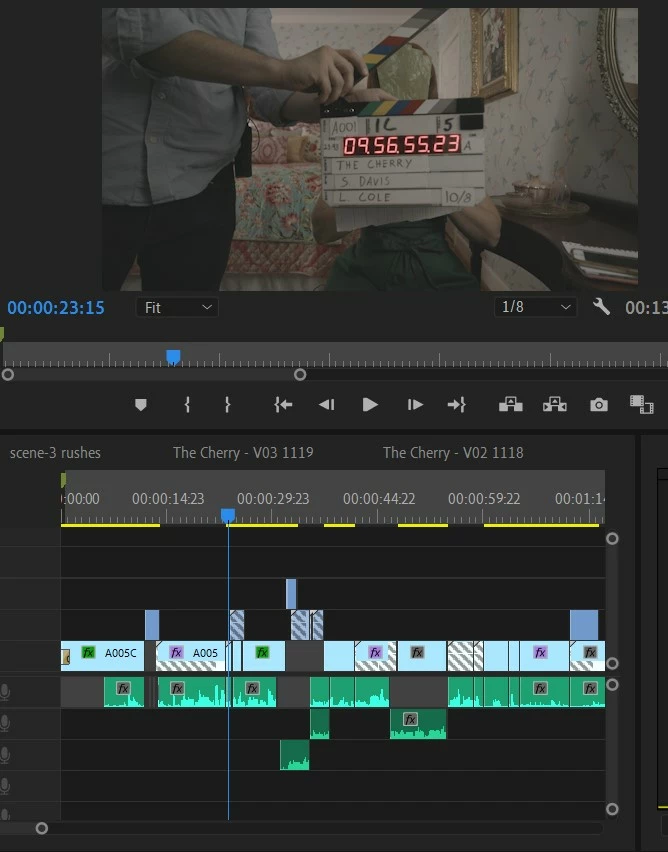
I am doing a clean-up edit on a project that was begun on the most recent version of Premiere Pro CC originating on a Mac machine. I have a PC running Windows 10 with the most recent version of Premiere Pro CC and when I open the project on my PC, the sequence is a mess. There are sequence clips that have shifted to the completely wrong selection of the source material, there are gray diagonal lines across many clips somehow indicating the sequence clip is longer than the source footage and therefore won't relink properly. I have NOT been able to find a way to correct these discrepancies. I opened the project on my Macbook, which has NONE of these issues, however, I cannot cut on that machine as it is a mid-2012 and isn't fast enough to handle the project/footage with out stuttering through.
I am speculating that the grayed out clips that will not relink are nested sequences. I don't see any easy way to undo the nesting and revert back to the source material aside from going to that source clip, re-cutting in the footage and lining it up with the audio. This has turned a day and a half re-cut into a 4-5 day endeavor, which is a problem for the timeline to finish this project.
Any tips would be greatly appreciated. I've included a screen-grab of the sequence below. You'll notice I stopped on a frame where the relinked clip is totally out of sync, hence the slate in the cut -- and you can see the grayed out clips that, I assume are nested clips that will not open on my PC properly.
 AdChoices