
procuts2
Inspiring
March 15, 2017
Answered

CS 6 Project will not re-open

  • March 15, 2017
  • 3 replies
  • 626 views

I am opening a project from a new client that will not re-open once saved. Lots of files need re-linking.  Any suggestions?
This topic has been closed for replies.
Correct answer procuts2

Jason:  Unsure what the sequence settings are as I took over from another editor running CS 5.5.  The missing effects were some video transitions in the .mov format.  What I ended up doing was copy-and-pasted to a new sequence, and all is well - project is delivered.

Thanks,

KGD

3 replies

procuts2
procuts2AuthorCorrect answer
Inspiring
April 6, 2017

Jason:  Unsure what the sequence settings are as I took over from another editor running CS 5.5.  The missing effects were some video transitions in the .mov format.  What I ended up doing was copy-and-pasted to a new sequence, and all is well - project is delivered.

Thanks,

KGD

Kenneth Davis, Director of Post ProductionPro Cuts Editing Services[Do not share PII or websites on signatures. This could cause a ban in the future]
procuts2
procuts2Author
Inspiring
March 24, 2017

Jason:

I copied everything on the Timeline then made a new Sequence and now,everything seems to work fine.   There were no missing plugins, according to my findings.  As of now, everything is operating.

When exporting, I notice that there are bars on the left and right side of the screen; some media is 2K and the others are 1080 HD.  Any suggestions to fix this?

Many thanks for your input.

Kenneth Davis, Director of Post ProductionPro Cuts Editing Services[Do not share PII or websites on signatures. This could cause a ban in the future]
jasontcox
Inspiring
March 15, 2017

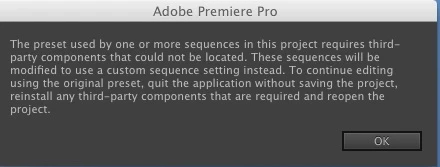
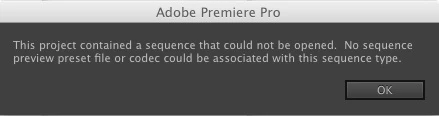
Well the first window is telling you that the project file has a plug-in that had been used that isn't installed on the current system you're using. Are you able to acquire/install that plugin? As for the 2nd one, have you tried creating a fresh project file and importing the needed sequence from the first project file using the Media Browser?

Importing sequences, clips, and compositions into Premiere Pro

procuts2
procuts2Author
Inspiring
March 24, 2017

Jason:

I copied everything on the Timeline then made a new Sequence and now,everything seems to work fine.   There were no missing plugins, according to my findings.  As of now, everything is operating.

When exporting, I notice that there are bars on the left and right side of the screen; some media is 2K and the others are 1080 HD.  Any suggestions to fix this?

Many thanks for your input.

Kenneth Davis, Director of Post ProductionPro Cuts Editing Services[Do not share PII or websites on signatures. This could cause a ban in the future]
jasontcox
Inspiring
March 26, 2017

Well to give the BEST recommendations, Id need to know what your sequence settings are and ultimately end destination for distributing the vide, but the QUICK fix is to select and right click any of the clips with the black bars in your timeline and choose Scale to Frame Size. You can select multiple clips at once so you don't have to right click 487 times on each clip that has the bars. Note that this is likely going to slightly scale your videos with the bars and crop the tops and bottoms, but this is the issue unfortunately when you have videos of different aspect ratios!