Participant
April 24, 2021
Question

CUDA Acceleration Colour Shift

  • April 24, 2021
  • 1 reply
  • 1225 views

Hi guys,


Posting this here because for some reason trying to speak to an Adobe employee is impossible.


For some reason selecting CUDA Acceleration is causing the black levels to get thrown out of whack in the playback window. This is the frame without CUDA selected : 
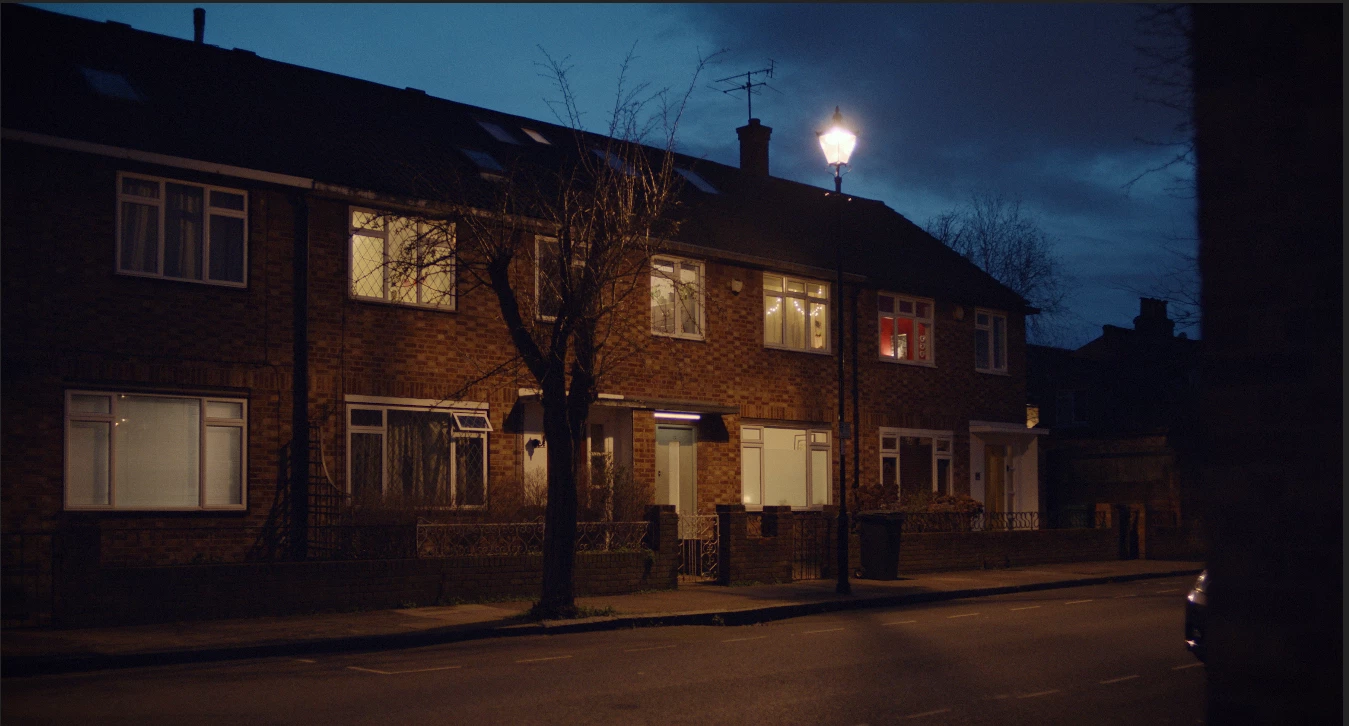


And this is the frame with CUDA : 
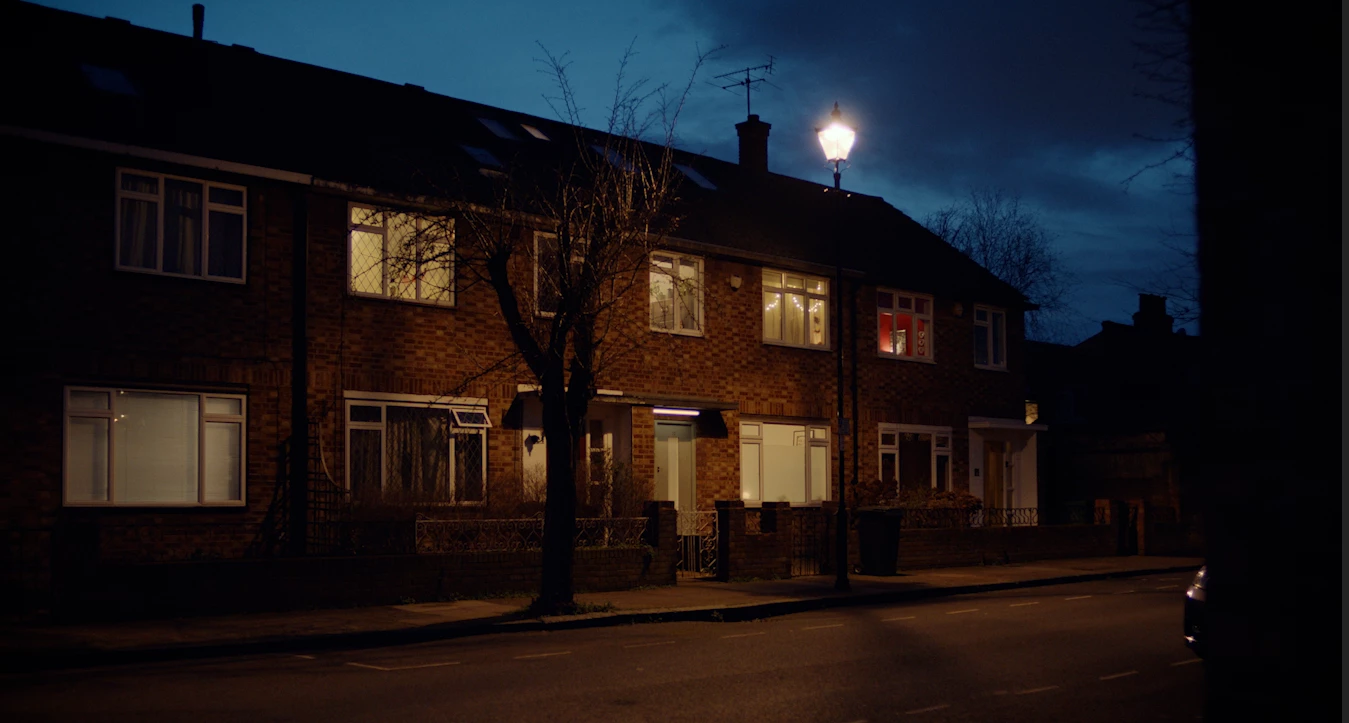


When I export the video from premiere the black levels are fine again. I really don't understand how CUDA acceleration could possibly have an effect on the black levels? My NVIDIA driver is up to date as is my version of Premiere.

Would love some ideas on this!

This topic has been closed for replies.

1 reply

chrisw44157881
Inspiring
April 24, 2021

nvidia control panel 16-235 video levels may cause some differences. also premiere preferences h.264 decoding checkbox.

Participant
April 24, 2021

With "Mercury Playback Engine GPU Acceleration" selected but "Display Colour Management" deselected, the colours in the playback window match the exported video in VLC and online. It seems weird that I should have to deselect the colour management in Premiere to get matching colours though - any ideas what might be causing this?

R Neil Haugen
Legend
April 24, 2021

For almost all video media, one should leave the video card settings for 'full/legal'  (the 0-255/16-235 stuff) either on auto (as in Resolve) or set to 16-235.Which sounds odd, but it DOESN'T mean the monitor will display Rec.709 media 16-235, but it will accept Rec.709 media as 16-235 mapped in the file (which it is) and display it as 0-255 on the screen ... which is the normal and correct process.


Very counter-intuitive, and like nearly everybody else, I got this wrong starting out. I got schooled by the colorists I now work for.


Color management is a morass, really. Different OS do things differently, as for example Apple's ColorSync color managment app uses what they call "sRGB gamma" for Rec.709 media. No one knows what "sRGB gamma" is from any standard though. What ColorSync applies in reality has been reverse-engineered to either 1.95 or 1.96 depending on who does the measuring.


The Rec.709 broadcast standard PrPro is setup to use period is 2.4.


Yea, not the same at all. So there was an issue with the ColorSync on Macs with the Retina monitors. Adobe then came up with the "display color management" option as a way to get the app to look at the ICC profiles of the monitors used and attempt to remap the image within PrPro to correct Rec.709 standards. On a Mac Retina, with DCM on, the image normally looks pretty appropriate for a Rec.709 clip.


It doesn't help though for viewing the file on a Mac after export. Adobe can't tell the OS or ColorSync what to do of course. But ... it can help on a Mac within PrPro.


And at times, it's good even for those on PCs to use. But depending on your gear and calibration processes, maybe ... not. So the user needs to check.


And yea, it's confusing as heck. On my system, I've run a full calibration via i1 Display Pro for Rec.709, and then ran a profile of that calibration to check it running Lightspace (a high-end pro calibration app) connected with Resolve to generate the patches. My graphs came out quite nice, dead-on for all Rec.709 specs. So I do not normally need ... nor in fact should I ... have the DCM option selected.


Many PC users with non-Rec.709 screens however should have DCM 'on'.


And ... if you're working with the Public Beta and trying to "play" with HDR on Windows, you need to have the Windows option for HDR for that monitor enabled and turn on DCM. So ... if I'm in the public beta messing with HDR, I have DCM on. If not, I don't.


In Resolve, there's the "Rec.709-A" export option, and yes, the A stands for Apple. It gives a slightly different NLC 'tag' to the file header, which ColorSync then uses gamma 2.4 while playing the file. So on a Mac with ColorSync, it looks as expected.


However ... on many b-cast compliant systems, with that tag applied, that file now plays too dark and contrasty.


And the above is the simple explanation of things.


Neil

Everyone's mileage always varies ...