


Known Participant
November 21, 2025
Answered

Customize, save and switch from one sequence look to an other

  • November 21, 2025
  • 2 replies
  • 281 views

Hi guys.

Is there a way to save a sequence looks?

You can of course save a preset but it's not what I'm talking about.

In Avid for instance, you can save looks but, most of all, you can switch from one look to an other and that's really interesting.

Let's say that you want to focus on the audio editing: you pick up a saved look with a nice zoomed audio tracks, you make your correction, and switch back to a look where you don"t see the waveform and have small audio tracks. This with a shortcut is a real time saver. No need to zoom in and out in the audio tracks anymore, just one click.

Correct answer MyerPj

With what Neil said, and presets you should be able to accomplish that.

<<You can of course save a preset but it's not what I'm talking about.>>

To what are you referring? You can save a Preset

<<Let's say that you want to focus on the audio editing: you pick up a saved look with a nice zoomed audio tracks>

That's exactly what you can do with the presets, no? Make your 'Audio Editing' preset <>

<> Excactly.

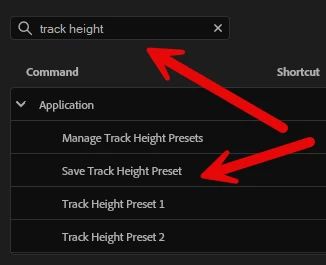
So, make those two presets, (tall audio tracks and/or tall video tracks) and you can assign a keyboard shortcut to them:


865371i8CE8A2DF51B4B458.png


2 replies

MyerPj
Community Expert
MyerPjCommunity ExpertCorrect answer
Community Expert
November 21, 2025

With what Neil said, and presets you should be able to accomplish that.

<<You can of course save a preset but it's not what I'm talking about.>>

To what are you referring? You can save a Preset

<<Let's say that you want to focus on the audio editing: you pick up a saved look with a nice zoomed audio tracks>

That's exactly what you can do with the presets, no? Make your 'Audio Editing' preset <>

<> Excactly.

So, make those two presets, (tall audio tracks and/or tall video tracks) and you can assign a keyboard shortcut to them:


865371i8CE8A2DF51B4B458.png


Known Participant
November 24, 2025

Oh, great, I didn't know these shortcuts. Thanx.

The presets I was referring to was the sequence presets, but you can use them only when you create a new sequence so I wasn't what I was looking for. But the new shortcuts you pointed will help a lot, thanx. 

Neil, you're right, few people go dig in the shortcuts but I must say that it's probably because this kind of tricks are not easy to find. I thought that the only shorcuts available were linked to actions that you could find with your mouse, as a time saver. But this "save track height preset" for instance does not exist anywhere else, right? 

Well, anyway, thanx to both of you, I've implemented ùy keyboard with these new ones 🙂

R Neil Haugen
Legend
November 24, 2025

It is well worth the time to go to the Keyboard Shortcut panel, and just go through all the available things. Premiere has far more than Resolve has yet for editing, about like Avid I'm told only the options avaiable are different between Avid and Premiere.

Everyone's mileage always varies ...
R Neil Haugen
Legend
November 21, 2025

There are quite a few available keyboard shortcuts you can assign to do things like set track heights and such. So go through the Keyboard Shortcuts panel and search for say Audio or Track height or whatnot.


There's a lot of things in there that can be useful but most people never go and look what's available.

Everyone's mileage always varies ...