
Participant
July 31, 2023
Answered

Date in order

  • July 31, 2023
  • 1 reply
  • 483 views

Hello


How to arrange all the pictures imported to a bin in the project? I want them arranged in the date the were taken befor I imprt the into the timeline...? Oldest pictures first:-) I can only arrange the by the name and size in my first attempt...
This topic has been closed for replies.
Correct answer Ali Jaber

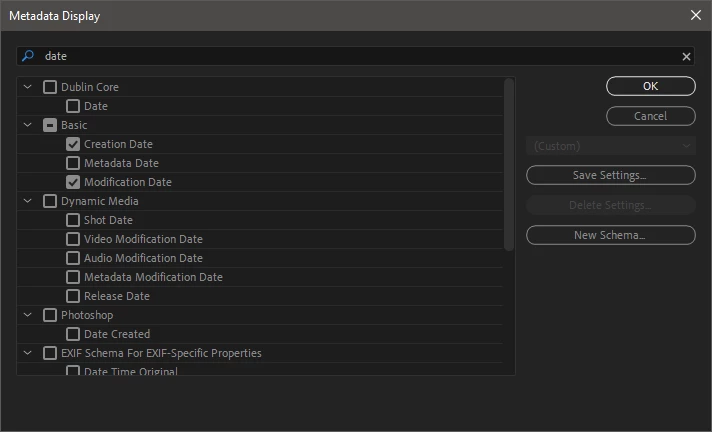
In the project panel, right click on the header of any column > Metadata Display.
In the Metadata Display search for date and check the "Creation Date" checkbox.


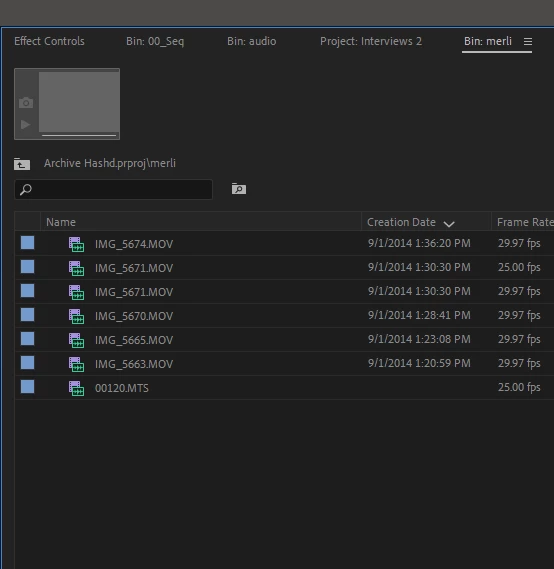
After that arrange clips by Date by clicking on the "Creation Date" header:


1 reply

Ali JaberCommunity ExpertCorrect answer
Community Expert
August 1, 2023

In the project panel, right click on the header of any column > Metadata Display.
In the Metadata Display search for date and check the "Creation Date" checkbox.


After that arrange clips by Date by clicking on the "Creation Date" header:


Rune5E38Author
Participant
August 1, 2023

Thank for great help👍 But now I have the newest pictures at the top. My goal is to have the oldest picture at the top. Can you help me with that?

Community Expert
August 1, 2023

Click again on "Creation Date" header and it will reverse the order.