
Participant
March 3, 2023
Question

Default export range

  • March 3, 2023
  • 2 replies
  • 447 views

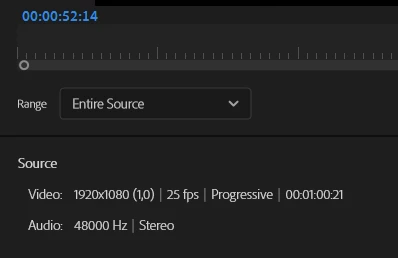
Is there a way to set export settings default to "Source in/out" instead of Entire Sequence? I believe it used to work for me before but somehow it defaults to entire sequence now even when I have in/out points set in sequence. 
 

This topic has been closed for replies.

2 replies

Participant
May 17, 2023

I encounter this same problem very often. When I set in/out points on the timeline, which is practically 90+% of the time in enterprise workflow, there are times when the Export window defaults to the Entire Source.


This same issue also extends to setting a shortcut key to send to Media Encoder (bypassing the Export window, because we use presets a lot). For example, when applying Ctrl+Shift+M to send the marked in/out sequence directly to Media Encoder, it dangerously defaults to Entire Source rather then the established in/out on the timeline, thereby making a shortcut key to send directly to Media Encoder, not very useful. Then I figure out during QC there are 10 seconds of null space at the end of an MP3, rather then 1 second (because the system is adding the copyright and blackspaces at the end, when I only marked just one second out at the end of the audio).


It would be nice to see this fixed again,

Kevin J. Monahan Jr.
Legend
March 3, 2023

clckwrk,

Sorry about that. I believe it may have been sticky before v.22. That would make it an issue that should be investigated. I'll move it to the Bugs forum and will upvote to get the ball rolling.


Thanks,
Kevin

Kevin Monahan - Sr. Community and Engagement Strategist – Adobe Pro Video and Audio