
Participating Frequently
October 3, 2024
Answered

Default export settings?

  • October 3, 2024
  • 3 replies
  • 1628 views

Hi

In pp 2023 I put the target bitrate at 1 for a specific clip, but since then every time I want to export something the default target bitrate is 1

is there a way to fix that?

I know I could have presets and so I have

but how to change the default bitrate?

Best
This topic has been closed for replies.
Correct answer Averdahl

Did you try to reset the Preferences as described abowe?


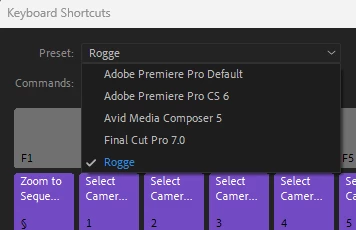
Your keyboard shortcuts will still be threre, just press Ctrl+Alt+K to open the Keyboard Shortcuts dialog and choose your Preset. (See image below)


quote
...but as Iexplained every time I restart premiere and start to export something thebitrate (and other settings) are the same I choose a long time ago for aspecific purpose
By @Nikbakht


3 replies

MyerPj
Community Expert
Community Expert
October 4, 2024

Yes, as Averdahl say, you must delete the preferences. If you haven't made many changes to them, it's a snap, but if you have you'll need to reenter them. In the past, I've taken a screen video of the prefs screen as I click to each tab. Then I can play-back and reset as needed.


So, saving an export preset doesn't set the bitrate as you want?

NikbakhtAuthor
Participating Frequently
October 6, 2024
Hi
Of course saving a preset gives me the bitrate of my choosing but as I
explained every time I restart premiere and start to export something the
bitrate (and other settings) are the same I choose a long time ago for a
specific purpose
Averdahl
Community Expert
AverdahlCommunity ExpertCorrect answer
Community Expert
October 6, 2024

Did you try to reset the Preferences as described abowe?


Your keyboard shortcuts will still be threre, just press Ctrl+Alt+K to open the Keyboard Shortcuts dialog and choose your Preset. (See image below)


quote
...but as Iexplained every time I restart premiere and start to export something thebitrate (and other settings) are the same I choose a long time ago for aspecific purpose
By @Nikbakht


Averdahl
Community Expert
Community Expert
October 4, 2024

The fix is to delete the Preferences. Close Premiere Pro, then hold down the Shift-key while launching Premiere Pro again. In the Reset options dialog, check the Reset app preferences and click Continue. This brings back Premiere Pro to the default settings.


NikbakhtAuthor
Participating Frequently
October 4, 2024
Tnx a lot
Does this resets also the keyboard shortcuts and workspaces and..?
MyerPj
Community Expert
Community Expert
October 4, 2024

The preference files are here: 

%UserProfile%\Documents\Adobe\Premiere Pro

Paste that line into File Explorer,


You should be backing up this folder.

Your keyboard shorts and Workspaces remain when deleting the Prefs by starting PP while holding down Alt. You'll just have to select both that you want again.


MyerPj
Community Expert
Community Expert
October 4, 2024

It's probably just using what you last exported with: You change that in the Video section on the Export page.


NikbakhtAuthor
Participating Frequently
October 4, 2024
Hi and thanks
That won’t solve the problem
I’ve changed the settings many times for different purposes but every time
I (re)start premiere and want to export something I get the same bitrate I
talked about