
Participating Frequently
September 9, 2023
Question

Deleting empty space from timeline taking ages to close gap

  • September 9, 2023
  • 1 reply
  • 872 views

Hi There,


Hoping someone can help me please. 

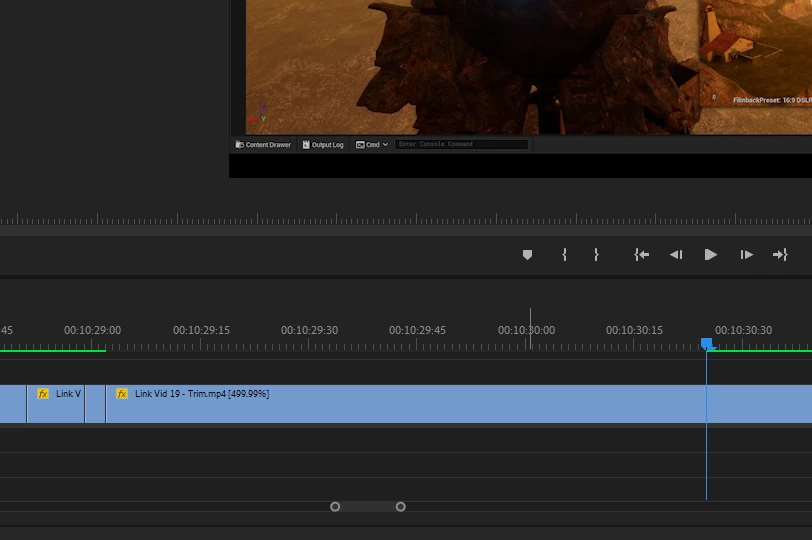
All of a sudden when I am deleting an empty space out of my timeline, after deleting a clip, it is taking ages for the viewport to update where my timeline is at. 


I've been deleting empty spaces of clips as I go along in this way for ages and have not had this problem before. 


I have captured a screen shot of the timeline just after I've deleted the empty space. The clips snap to each other straight away like normal, however it's the green bar along the timeline that seems to take ages to update and the clip in the viewport so I can see the new end of the clip. This is slowing down editing quite a bit as I am having to wait for it to update before I can continue. 


Not sure if I've explained that very well but really hope someone can offer some suggestions.


Thanks so much.
 

This topic has been closed for replies.

1 reply

Peru Bob
Community Expert
Community Expert
September 9, 2023

Delete the Media Cache and Media Cache files:
https://community.adobe.com/t5/premiere-pro/faq-how-to-clear-your-media-cache-in-30-seconds-in-premiere-pro-2020/m-p/11017257/thread-id/260446?page=1

If that doesn't work, try resetting the preferences:
https://community.adobe.com/t5/premiere-pro/faq-how-to-reset-trash-preferences-in-premiere-pro/td-p/8236158?page=1

If that doesn't work, try resetting the Workspaces:
Reset a workspace
Reset the current workspace to return to its original, saved layout of panels.
1. Do one of the following:
• Click the Workspace menu icon and select Reset to Saved Layout.
• Choose Window > Workspace > Reset to Saved Layout.
from here:
https://helpx.adobe.com/premiere-pro/using/workspaces.html

If that doesn't work, try Preferences > Audio Hardware and set Input to None.

If that doesn’t work, try updating or rolling back your graphics driver directly from the video card manufacturer’s site. If NVIDIA, do a clean installation of the latest Studio Driver (NOT the Game Driver)

If that doesn't work, try creating a new project and import the old one into it.

Participating Frequently
September 9, 2023

Hi Peru


Thanks so much for your speedy reply!


If I clear my cache will it damage my file in any way?

I've been working on this project for months and I'm worried I'll lose or damage my project.


Thanks again.


Peru Bob
Community Expert
Community Expert
September 9, 2023

If you delete the Media Cache, any needed files will be recreated by Premiere Pro.

There is no danger in deleting the Media Cache.  In fact, it is recommended to do it on occasion to help performance.