
Inspiring
November 28, 2024
Answered

Detail workflow | Error compiling movie | selector 17 | error :-1609629695

  • November 28, 2024
  • 7 replies
  • 473 views

Hi there, i'm out of options here, so i need help.
For some reason i can't export my video.


System infos :  
RTX 3060 ti
I7 6700k

32Go RAM

Windows 10

Premiere pro 25.0

Oh yeah my datas for this video are saved on an external hardware HDD. Before you ask, no i can't transfer 300go to my computer.


It's a 10 min Documentary for my client


I've tried so much thing that i got lost.

  1. render without CUDA
  2. delete warp Stabilization
  3. Re launch Premiere
  4. change sequence
  5. export with Media Encoder
  6.  preview Quicktime 442LT to MPEG
  7. delete Dynamic link
  8. restart PC
  9. Reset preference
  10. Delete cache
  11. Change h.264 export to Quicktime 4444 export
  12.  delete the Rendered files
  13. Unlink and relink my media
  14. Try to export slice of 2 min instead of full 10min but got other problem
  15.  and more trick that i surely forgot


By the way, render in premiere with proxies works but not with original clips.
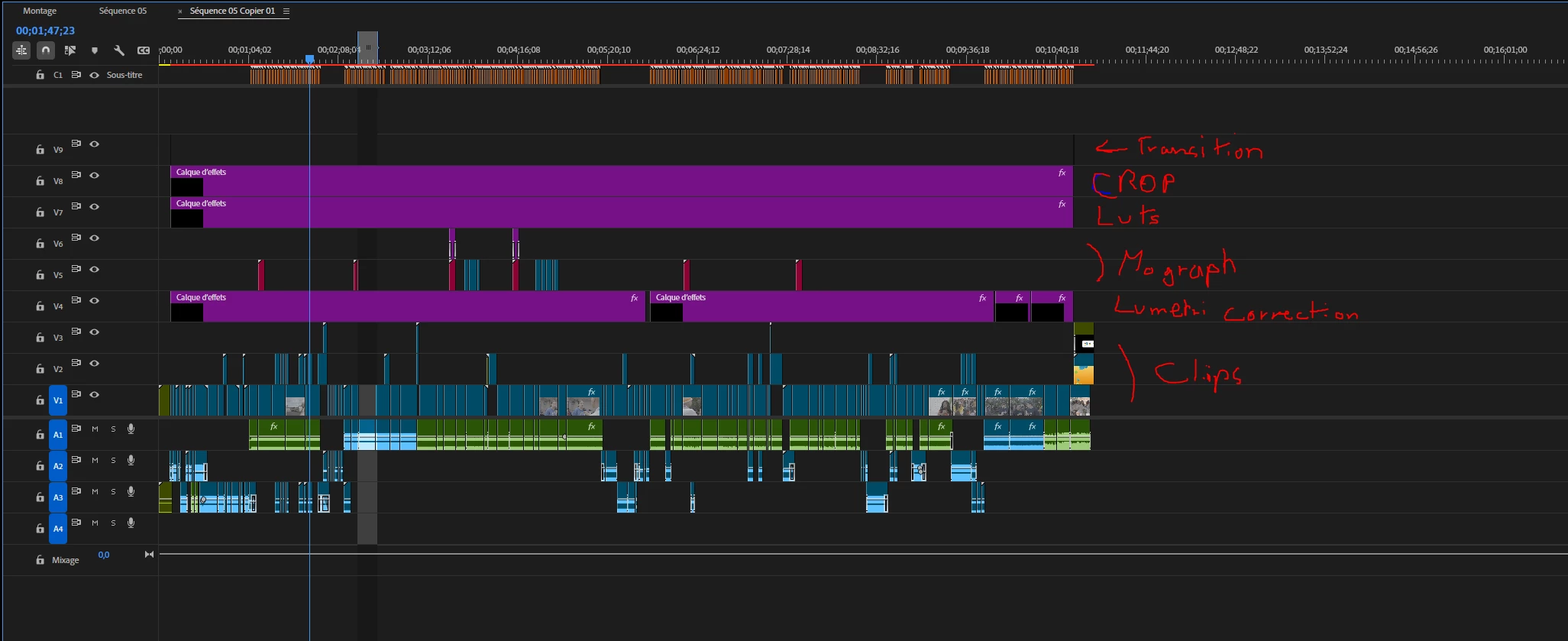
Well, right, now i'm out of ideas, and i need to deliver it quick.

I can't begin a 9 hours export (export without CUDA) to get an error 3 hours later
Oh and most of those solution drove me to another "export failed" screen.
I can't find a solution on internet and i even can't find a doc that help me Read the error panel.
Found online one guy having this problem years ago. He got no responses.


Ask me your question but help me pls
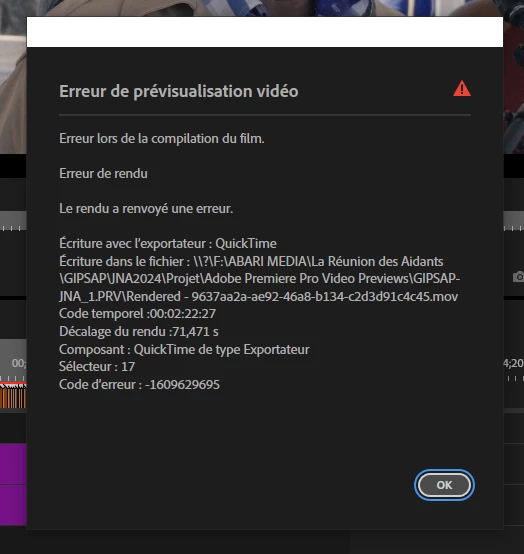
Correct answer Abari5EAB

Well Hi guys, sorry for the long silence. So i've tried your suggestions and i finnaly exported the video.
First of all, i try to export to another location. Doesn't work

Try to render and remplace but got a lot of trouble exporting it. Premiere didn't handle the render or just not Save the project.

So i tried to split the sequence and exported it :

S1 : Audio (it work)

S2 : Video without fx (doesn't work at first) BUT i remplace all Grouped sequence ("imbriquer" in french) and Dynamik Link files.then it works

S3 : Motion design elements : Lower thirds, subtitle etc.. render em before export (it works)


And finally i putted every exported pieces together like a burger and it works.

But there's a twist, I exported on the new Mac of my buddy (with the same HDD). Why ? Because even with the burger my premiere won't export. The last frame causing an error.

And so here we are. The video drop a bit on quality but at least i can deliver it.
Still need the file ? How could i send it to you guys ?

7 replies

Abari5EABAuthorCorrect answer
Inspiring
December 6, 2024

Well Hi guys, sorry for the long silence. So i've tried your suggestions and i finnaly exported the video.
First of all, i try to export to another location. Doesn't work

Try to render and remplace but got a lot of trouble exporting it. Premiere didn't handle the render or just not Save the project.

So i tried to split the sequence and exported it :

S1 : Audio (it work)

S2 : Video without fx (doesn't work at first) BUT i remplace all Grouped sequence ("imbriquer" in french) and Dynamik Link files.then it works

S3 : Motion design elements : Lower thirds, subtitle etc.. render em before export (it works)


And finally i putted every exported pieces together like a burger and it works.

But there's a twist, I exported on the new Mac of my buddy (with the same HDD). Why ? Because even with the burger my premiere won't export. The last frame causing an error.

And so here we are. The video drop a bit on quality but at least i can deliver it.
Still need the file ? How could i send it to you guys ?

IanB_360
Community Manager
Community Manager
December 2, 2024

Hi @Abari5EAB 

Could you send the Project over to us? We don't need the media just the project file to take a look and see if there is something in the project settings or if it is the files themselves that is giving you this error? I would also try to export to another location and see what happens when you do small sections. See if you can find a problem clip and start pulling your sequence apart in small chunks to see if there is a rhyme or reason to why it is taking long to export.


Thanks

Ian

R Neil Haugen
Legend
November 28, 2024

So you had Warp, Lumetri, and other things all together? Export from and to an external spinning drive?


No wonder you're having such issues!


Warp is the heaviest resource demand effect, even more so than Neat video.


I've got a 24 core 128GB RAM and 2080Ti desktop, twin Nvme drives for OS/programs and separate for all cache files, and 8 internal SSDs. And I always process Warp doing a Render and Replace operation, then add Lumetri and others to the clean file with Warp baked in.


Render and Replace all clip with Warp. Then add Lumetri and other effects. THEN try to export.

Everyone's mileage always varies ...
Abari5EABAuthor
Inspiring
November 28, 2024

Well i've try your suggestion and also change pc btw. 

Something really weird happened. I tried to export slice of 2 min without GPU and after deleting stabilisation and fx layer with colo on. 

I've got an error from a time stamp out of the selection.
Like : In at 2:30 OUT at 4:30 Error at 6:32

Wtf is that ?

R Neil Haugen
Legend
November 28, 2024

Another comment, is that when it gives you a time stamp, go there.


You may find that you rebuild that section, the whole thing works.


And depending on the connections, exporting to a spinning drive that is also home to the project and media files ... has historically had issues. There's so much reading/writing going on it's very difficult to get the data processed without issues.


So if you could do the export to any other internal drive, even if you then moved it to the external, it would probably be easier.

Everyone's mileage always varies ...
Abari5EABAuthor
Inspiring
November 28, 2024

Hi thanks for your response, 

Um yep i'm export on the same drive ^^

BUT there is still 40 + Go space into


Update : this morning i try to create a new project import the sequence and render it. Still doesn't work

R Neil Haugen
Legend
November 28, 2024

First, i hope you're not exporting to the same drive the media is on?


And of course, Premiere requires something like 4-5 times free space on the drive as the exported file will be.

Everyone's mileage always varies ...