
Inspiring
August 8, 2020
Question

Device Control and Recordsettings

  • August 8, 2020
  • 3 replies
  • 950 views

Hello,

I have the following view under Project Settings - General and not the selection DV / HDV!
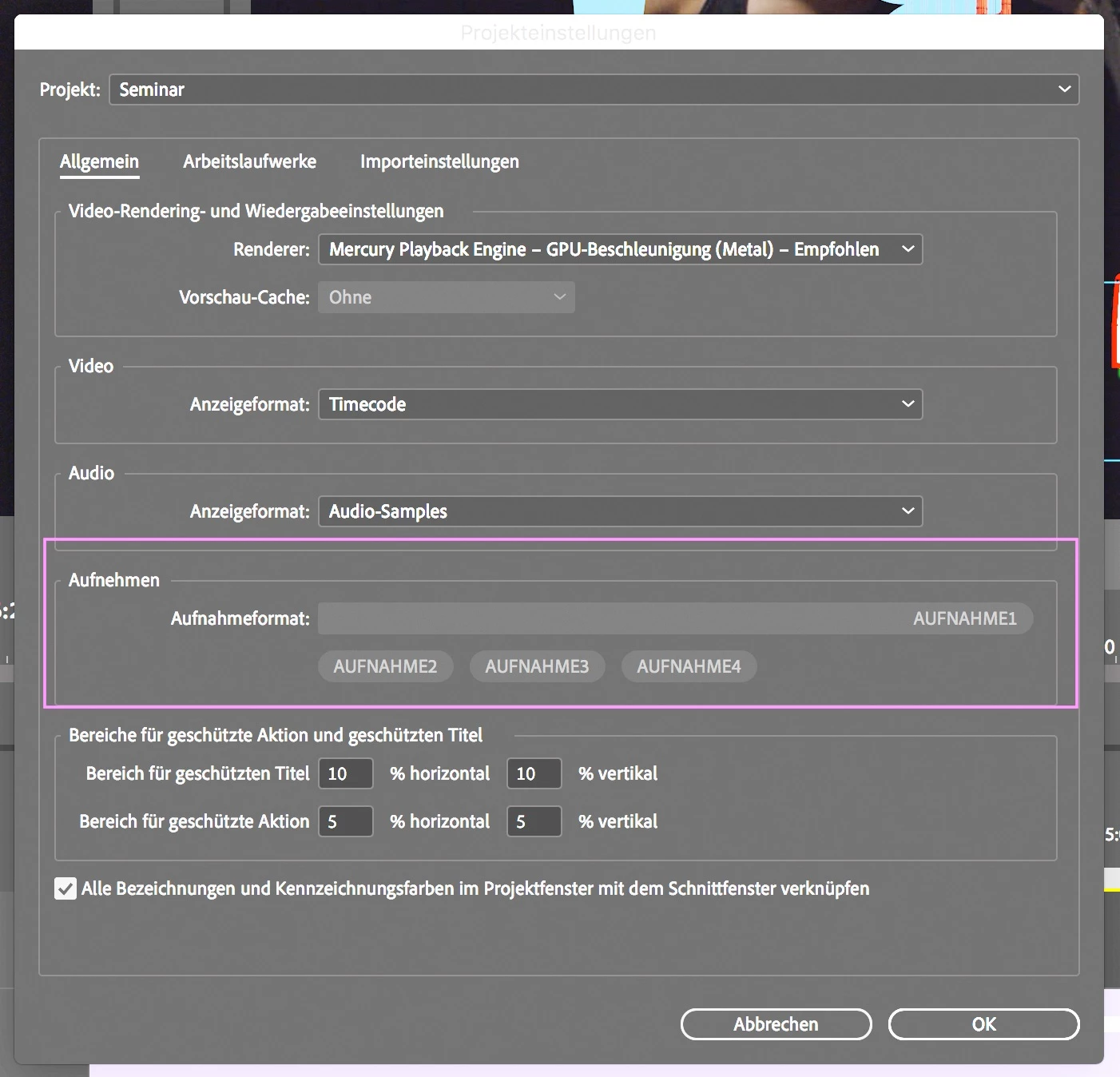


How can that be?

Device control is not available!

Under File - Record - Settings - Edit, Premiere Pro immediately crashes with a fatal error!

Under File - Record - Recordsettings from Windowmenu, Premiere Pro immediately crashes with a fatal error!

Under File - Recording - Settings - Device Control "none" is selected and in the white window above there is no HDV or DV, as it was in the previous versions! Older versions of Premiere Pro are working well so far.
This version also works on another iMac under OS 10.14 Mojave, at least without
these errors!

Under Preferences - Device control "None" cannot be saved, "DV / HDV device control“ always appears!
And
all older versions of Premiere Pro have now adopted this behavior !!!

And don't forget the error "a low level exception occurred in: DeviceController"!


iMacPro - OS 10.13.6 - PrPro 14.3.1

Greetings from Germany

R. Stephan

This topic has been closed for replies.

3 replies

Inspiring
September 22, 2020

What's that about?
Now version 14.4 is here and only nonsense is displayed under Preferences / Device Control!
Premiere Pro still crashes immediately under File / Record Settings / Preferences / Edit!
Presettings / device control "without" will not be saved !!!
Project settings / general - where did the selection HDV / DV go? For me there is recording1 recording2 recording3 recording4!
iMacPro - OS 10.13.6
With OS 10.14.6 everything is ok!
So OS 10.13.6 is no longer supported !!!


Greetings from Germany

R. Stephan


Inspiring
September 23, 2020

HDV and DV devices require the OCHI Firewire controller. The OHCI is part of the OS. People have stated with the latet version of OS X the OS cannot dectect the OHCI Firewire controller. That is why you do not see the HDV/DV option. If you don't have any other I/O device connect to your computer you will have no other options.

Inspiring
September 23, 2020

Hello Andy,
I have the OS 10.13.6!
And I see in all older Versions of Premiere Pro this:


Greetings Ralf

Inspiring
August 11, 2020

I have read in FCPX forums that Firewire support is a thing of the past with the latest version of OS X.

Inspiring
August 13, 2020

I have no Firewire Connections on my iMacPro with OS 10.13.6  and I use for my external SSD's (Lacie Bolt3) only Thunderbolt!

Ralf

R Neil Haugen
Legend
August 8, 2020

Weird ... I'm still seeing the expected Capture section.


Neil

Everyone's mileage always varies ...
Inspiring
August 11, 2020

Actually, I expect these settings and my colleagues on other operating systems have this!


Ralf

Kevin-Monahan
Community Manager
Community Manager
August 11, 2020

Hi Ralf,

Sorry for this. Are you using the "Productions" feature to collaborate? Do you have any other video decks connected to your computer?

Thanks.
Kevin

Kevin Monahan - Sr. Community and Engagement Strategist – Adobe Pro Video and Audio