
Known Participant
August 1, 2025
Question

Diferencias de Color en el display entre After Effects y Premiere Pro
  • August 1, 2025
  • 1 reply
  • 104 views

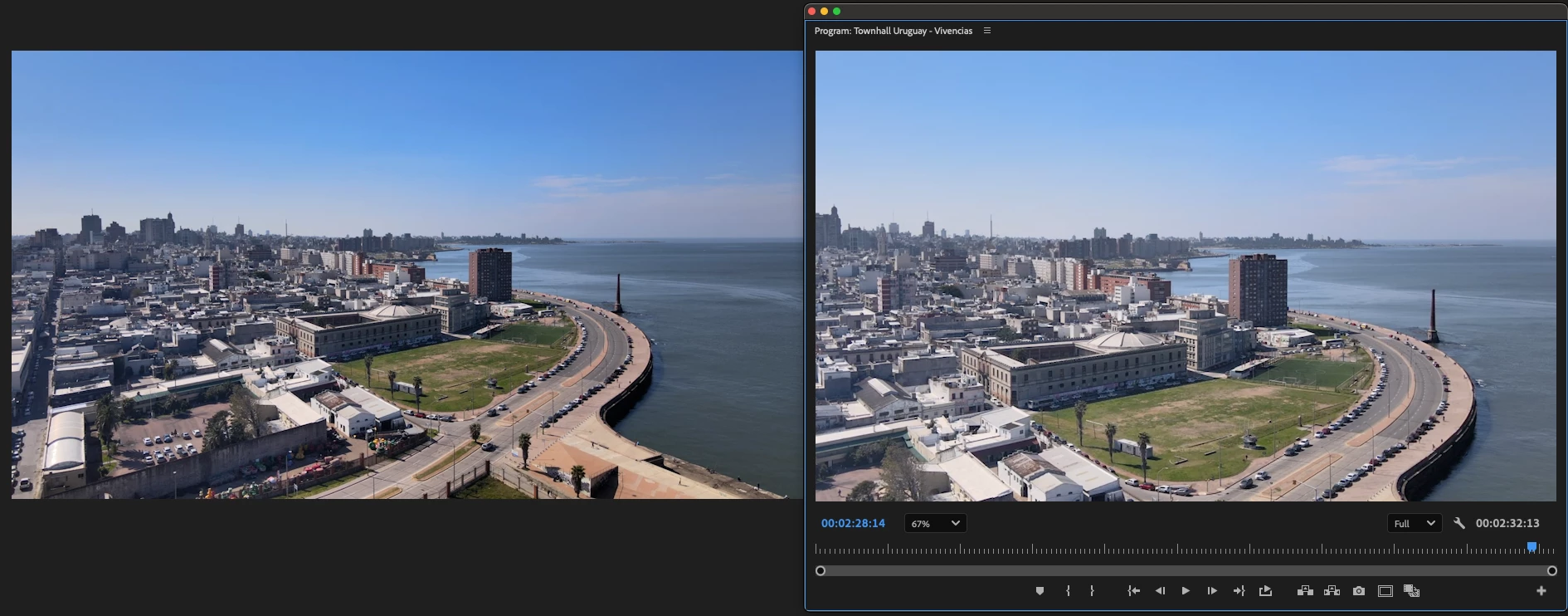
Cuando se setea el proyecto en Premiere y After Effects con el mismo Color Management, se genera un problema en el display. 
En la imagen se pueden ver cómo se muetra la imágen sin ningún tipo de efecto aplicado en AE (a la izquierda) y Premiere Pro (a la derecha). En ambos está seteado el color de la misma manera Rec. 709 2.4 Gamma.
Es un tema solo de display, porque cuando la composición se exporta y se lleva a premiere el color "se ve correctamente".

Ambas versiones de software son la última versión disponible. 

1 reply

jamieclarke
Community Manager
Community Manager
August 1, 2025
Rula0605Author
Known Participant
August 1, 2025

Thank you @jamieclarke for pointing the article to me. However, and maybe I'm missing something, it doesn't apply to the bug I'm asking about since it applies to SDR media. The image I posted has not been modified in any way, and we have not changed the settings of the clip in premiere before sending it to After Effects (and it's the same with other footage).
I understand that we are talking about display things, but if we need to color correct something in After effects, would be nice to have the same display as premiere so we do not have to waste time exporting just to see if it matches. 

And if a suggestion is allowed, maybe give us  the option for the "color management mismatch" warning in After effects when sending something from premiere.

jamieclarke
Community Manager
Community Manager
August 1, 2025

Hi @Rula0605 - Can you provide more information of the exact steps needed to reproduce the problem.  In the wrench menu of your source monitor there are new settings to "Monitor Color Management". Can you right click on your file and choose "Media File Properties" then post a screenshot.