Different colours & contrast between the source & programme window
Hey everyone!
Got a bit of a weird one for you, i'll try to make it as simple as possible,
The left image is the Source window, and is in the following...
Color Space: Sony S-Log3/S-Gamut3.Cine Color Space Override: Rec. 709
On the right is the Program window, the sequence sharing the same working colour space, but as you can see, the footage looks vastly different.
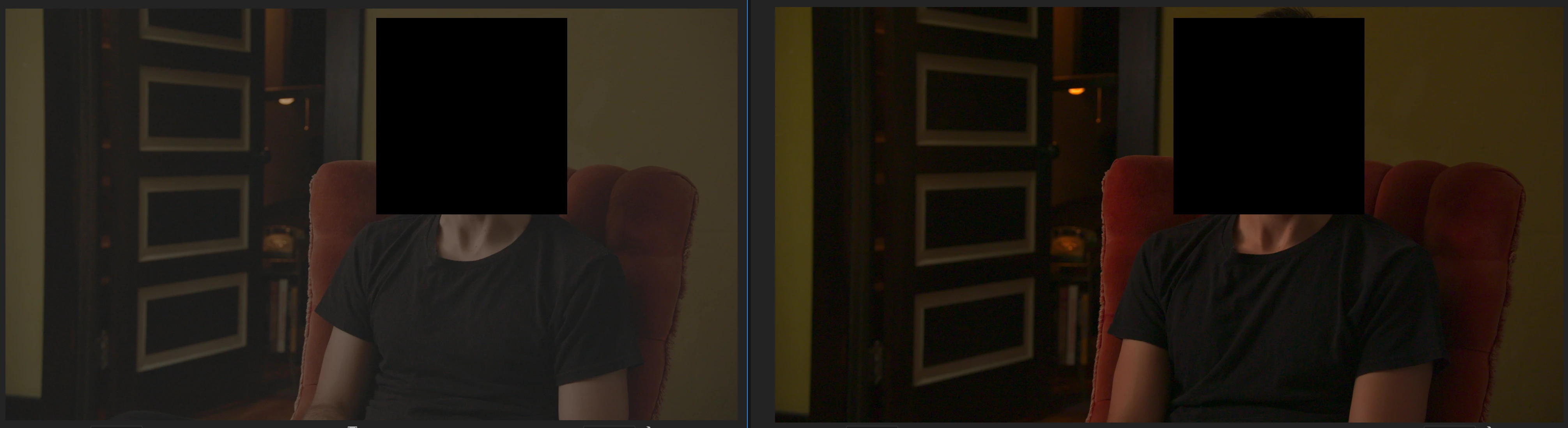
- I have no effects applied to the (right) clip. I checked both effects controls & lumetri color panel
- I've updated to 2023 & also tried again on 2022
- I've tried toggling the FX button, and no change to the footage
- I've reinstalled premier pro from the ground up
- I've cleared the cache
- I asked a colleague to open the same project on their rig, the same issue persisting which makes me believe this is not a screen or display issue.
- I've doubled checked the footage in finder & revealed it in project & finder and both are flat profles like on the left
My only working theory is to do with this dialogue box that pops up when i open Premier Pro (both 2022 & 2023) both these named effects are missing from my 'effects' window,
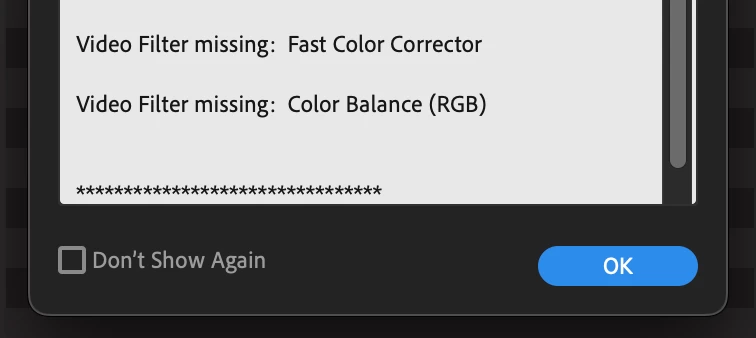
I believe the issue may fall here, i think for some reason Premier may have applied these effects to the timeline / footage, and can now not read them which means i therefore cannot remove them / see them? It's worth noting that these effects are also no visible in the effects tab (it's a working theory and makes no sense but i'm desperate) or ultiamtely this could just be a bug?
I'm on an Apple M1 macbook, Monterey for reference
Any help or ideas would be greatly appreciated!
Thanks
 AdChoices