
Ken Nielsen
Legend
December 4, 2020
Answered

Difficulty and Failure trying to apply cross-fade transition

  • December 4, 2020
  • 2 replies
  • 2529 views

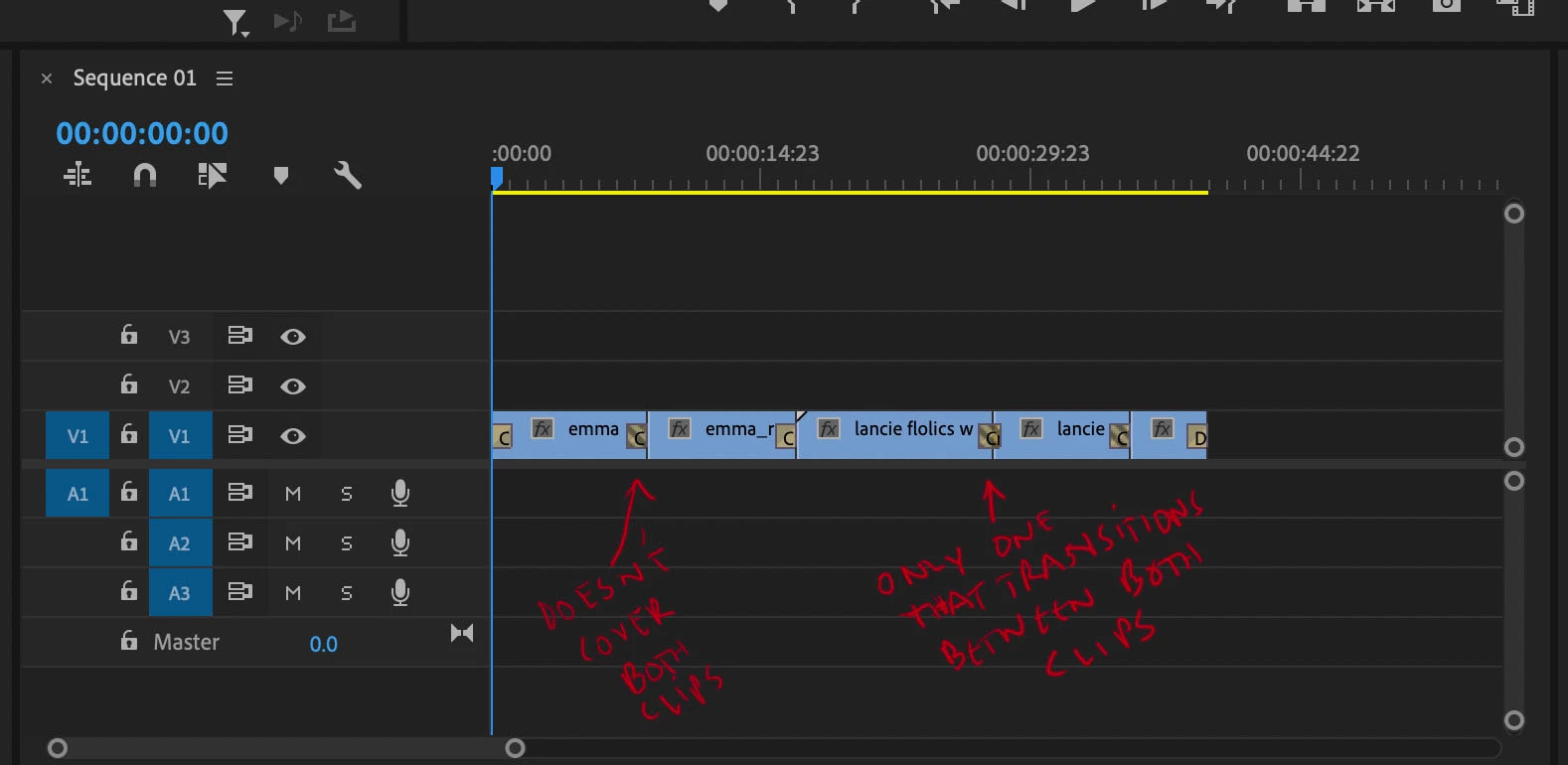
It has worked well in the past but now, applying transitions to clips on the timeline seems to be a hit and miss process. I've tried selecting two clips and with cross-fade set as my default transition hitting command + D does nothing. When I drag the cross-fade icon from the effects panel over the point between two adjacent clips it acts like it is going to work but when I release the cursor the transition is not there. The best I have been able to do is drag the cross-fade to one side of the adjoining poing between clips and it then drops to one side or the other. Only by accident, I don't know how, just one time after an hour of attempts, one cross-fade did land where it should have and is affecting the trasition evenly between two clips. Is there any advice in what might be going wrong? or should I just turn the computer off and walk away and do something else today?

TIA,


Ken
This topic has been closed for replies.
Correct answer Jeff Bellune

The stripes in your transition icons indicate "danger". There are not enough "handles" (or frames of footage) in one or the other or both clips to create the transition. Try overlapping the clips to give yourself enough frames, then reapply the transitions.

2 replies

R Neil Haugen
Legend
December 5, 2020

"Handles" are one of those gotcha things. Until you understand them, transitions are screwy. After you understand them, they make sense. And for a lot of us, it takes some time to really absorb what is happening, and why 'handles' are necessary. And understanding what happens during them.


Neil

Everyone's mileage always varies ...
Ken Nielsen
Legend
December 5, 2020

Thanks R. Neil, It's very humbling to discover how much I don't know... Just this one subject should keep me busy for a while now... Thank You.

Ken

R Neil Haugen
Legend
December 5, 2020

I'm very, very aware of my vast lack of knowledge compared to so many others. I've told people that Premiere has a steep learning curve at first, but don't worry about it.


It gets a lot steeper a little farther in ... sigh.


Neil

Everyone's mileage always varies ...
Jeff Bellune
Jeff BelluneCorrect answer
Legend
December 4, 2020

The stripes in your transition icons indicate "danger". There are not enough "handles" (or frames of footage) in one or the other or both clips to create the transition. Try overlapping the clips to give yourself enough frames, then reapply the transitions.

Ken Nielsen
Legend
December 5, 2020

Thanks Jeff. Amazing that none of the references I looked at even mention such a 'now obvious' requirement. I appreciate your keen sense and for helping me out of a rut with this.


Ken

Kevin-Monahan
Community Manager
Community Manager
December 5, 2020

Hi Ken,

Sorry for the frustration in seeking out info. Did you check out the manual? Handles are explained there if you scroll down a little: Applying transitions in Premiere Pro.

User guide is a good source of stuff. I try and help the writing staff if I can. Let me know if there's anything you are having trouble with finding, or just ask here. We can help you.


Thanks,
Kevin

Kevin Monahan - Sr. Community & Engagement Strategist – Pro Video and Audio