


Known Participant
December 4, 2024
Question

Direct 2D Drawbot Error - Invalid Widnow Handle. HRESULT: -2147023496

  • December 4, 2024
  • 18 replies
  • 5308 views

Can someone help me with this issue? I've searched for a while on the internet and nothing to be found about this specific issue, I am getting "Direct 2D Drawbot Error - Invalid Widnow Handle. HRESULT: -2147023496
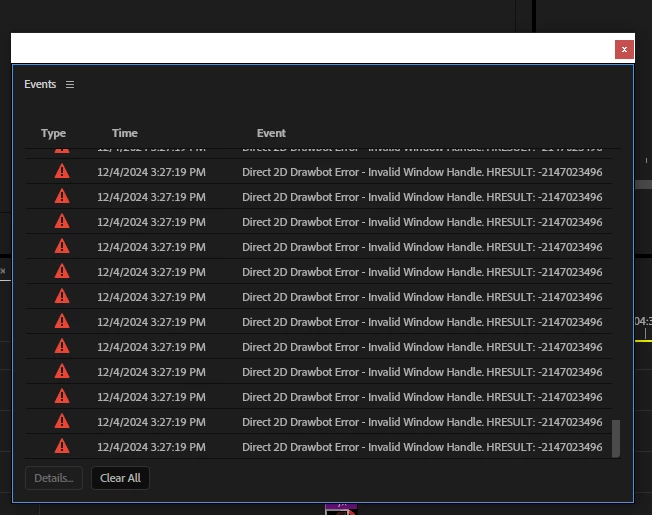
 

That's a screenshot of the Error, the timeline after a couple minutes are passed editing the project becomes completely unusable, I can only drag the playhead thru the timeline but nothing else, when I click any panel on the upper left such as "Sequence" I get all the options white, no option to be actually seen


I've been experiencing this since late 2024 builds but don't wanna downgrade back to 2024 as 2025 & Beta is running too smooth on my pc, except for this constant "crash" i get, since i have to reopen the app everytime this happens


I also have a screen recording of the bug happening on Beta, but it crashes instead of giving me any Error codes, on premiere 2025, though, if i wait after the bug happens it will give me the error code ive uploaded on the screenshot


Version I am currently using: latest premiere pro 2025 version but it would also happen on the 24.6+, including Beta versions. I can recall it didn't happen on a specific Beta build that was released a few days ago but I updated like a day later and it was back happening again


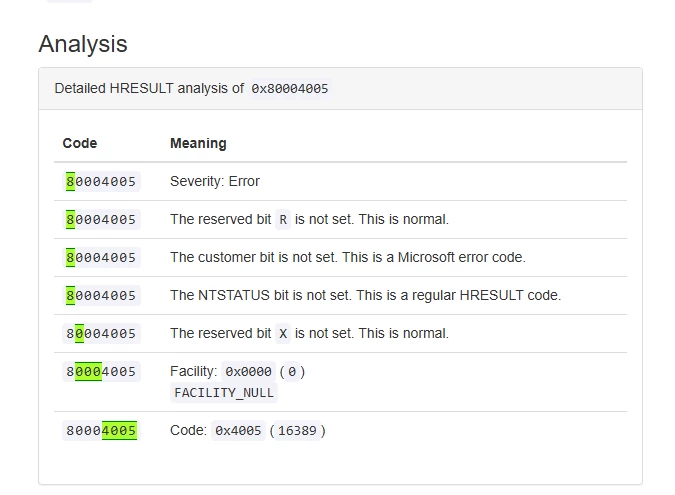
Also searched for the HRESULT value as hexadecimal and it returned me this
 

[Title edited by mod for clarity]

18 replies

jstrawn
Community Manager
Community Manager
March 4, 2025

Thanks very much to those that have reported this and helped us isolate the problem. I received a large (150 GB) project + media set from @Pitepx and I tested it quite extensively using recent Beta builds od Pr 25.2 and 25.3 as well as the current release version, which is Pr25.1x073. The only repro steps I know of are toy do a lot off shuttling, jogging, JKL playback in conjunction with some basic editing things like trimming and moving clips. 

So the good news is that the problem was not happening at all in any of my tests, including in the latest Pr 25.3 beta builds. But it also did not happen inthe relase version of 25.1. So I can't say for sure that it's fixed with @Peter_Antal 's latest changes, but it's looking good so far, at least from my point of view. Please, for those of you who have been experiencing the problem lately, can you upgrade to the latest beta build (Pr25.3xBeta003 or higher) and let us know if the problem will still happen for you? 

Participant
March 18, 2025

still comes up on ae. HRRESULT: -2005270523. not fixed. yay.

PitepxAuthor
Known Participant
December 14, 2024

@Peter_Antal @jamieclarke after some time editing, the problem was still gone, then back, then gone again and honestly I can't know what I did to get it back, then gone, then back again. I'll be getting the project collect later today while I'm asleep since it will take a bit (it's a newer project with around 150 items so it is easier than the previous one which had like 2k)

Adobe Employee
December 9, 2024

Thanks for the follow-up - Sorry to hear on your folder loss. Hmm, so the problem disappeared or slowed down substantially at the moment? If your repro has decided to make itself disappear, we probably won't be able to see it either.


We did put out a fix for an issue related to leakage in progress view dashboard into beta prime last week. I wouldn't have expected that to be elicited with what you saw with timeline, but may possibly explain.
P: Transcription leads to errors, video artifacts,... - Adobe Community - 14987974


It's also possible your repro was a very unusual set of factors combined, and your more recent editing hasn't tripped the same issue yet.


In any case, the GDI object report has been proving itself effective to help us narrow such culprits down, if similar leak situation is re-discovered going forward. 

PitepxAuthor
Known Participant
December 9, 2024

@Peter_Antal @jamieclarke Okay so today I accidentally deleted the whole folder where I would save my premiere pro projects, which is bad yeah I lost 2 or 3 days of work but apparently the problem is gone?


I've been editing for a couple hours w/o checking the GDI Objects, cause usually I only restart it when it hits around 45k and it took like 3/4 hours to hit around 40k.


After deleting my whole premiere pro projects folder I got only this in around 3 hours of work


(Premiere Pro is the 393 one) I don't know why it's apparently gone after deleting the folder where I saved all my projects from the last 6 months but I will keep working as usual and I'll see if it comes back later today.


Sorry for losing my other projects, I can still upload the media that wasn't in this folder, which are a couple copypastas' extension PNGs and I can also give you a copy of my current project that is not giving me the issue

I'm currently using the 25.0 build 61 btw

Adobe Employee
December 9, 2024

A share of repro Jamie and I indeed sounds good. Your full project isn't needed- you may find that could be a lot of media to share up.


We just need something representative to support replication the problem of the GDI leakage, as visible in the Windows task manager. The smallest timeline which still allows that is ideal to help with handling.

jamieclarke
Community Manager
Community Manager
December 9, 2024

Hi @Pitepx - Were you able to upload that project and media to us?  Thank you for your help in troubleshooting and resolving your issue.

Participant
February 7, 2025

Hello Jamie, i got the same error as pitepx did we find a solution ?

Adobe Employee
February 7, 2025

FYI - @Pitepx Did not report any supplemental details about the repro, their last message implied no further repro. We don't know what exactly their usage was, so can't comment on if their particular case was hardened.


@odysseas_7561  -  What version of Premiere are you running on- was there any particular usage pattern you were doing? How long in time does it take for you to reach this error?

That invalid window handle errors from windows would most typically be explained by if Premiere's Windows OS GDI object count crosses over OS allowed maximums(10000 objects by default). 

To understand and durably fix a resource leak of that sort, and to understand a lot of these bugs, we need information to narrow down the circumstance of where it's encountered. 


Leaks manifest themselves if regularly showing and hiding some UI, or repeatedly performing an operation a steady increase of GDI object use arises which doesn't get reclaimed. Windows OS Task manager details pane can be configured to show GDI Object usage, which can be very helpful to narrow down when the leakage occurs.


There are not a lot of user reports around this error, and it isn't an issue which is readily observed from routine testing, so your context is appreciated to help us move forward toward resolution for potential sources of it.

PitepxAuthor
Known Participant
December 7, 2024

@Peter_Antal I can try and get a whole collect of my current project which I am pretty sure would get a crash under the default 10k quota setting - upload it to G drive and send the link to jamie, let me know if that would be of your interest so I can go forward


As we are here, can you forward this topic to some1 to see if they can gimme any update on it?

Adobe Employee
December 7, 2024

@Pitepx - Update: On Windows OS, I am currently unable to repro your GDI resource leak on playback using the project you shared to Jamie. With just the project as-is (no media) and as well with substitutions for offline files, GDI resource use was holding flat for me.


Unless @jamieclarke was able to found a trick to replicate on his end, it's looking likely there is a combination of specific formats and/or filters codepaths together with the hardware accelerated UI mode as neccessary to elicit this repro.


Jamie may have ideas on best way to deal with this kind repro'es, but for something like this I'd suggest a bare minimum "toy" project with small representative media file as ideal to replicate the leak - the full crash isn't necessary. With such a project loaded, I'd expect that when I play that content from timeline, windows task manager would track a steady rise of GDI objects from the "Details" pane, when "GDI Objects" are enabled as a column under observation.

Adobe Employee
December 6, 2024

The limit affects how much UI resources Windows OS allows application UI to use.


@Pitepx -  That adjustable limit is not a generally used feature. Microsoft recommends keeping it at default level of 10k, they haven't called out specific hazards, and do acknowledge some apps do need more, but do note it has the potential to be abused by malicious applications also.

In practice, if you saw a bunch of other apps on your machine use more GDI resources than 10k, or behaving eratically you'd probably want to consier resetting that down.


The elevated quota should not normally be needed for Premiere, and once fixed, I'd advise against leaving it relaxed where not needed.

IanB_360
Community Manager
Community Manager
December 5, 2024

updating status.