
FlyingFourFun
Legend
November 3, 2021
Question

Display Color Space Meta Data

  • November 3, 2021
  • 2 replies
  • 557 views

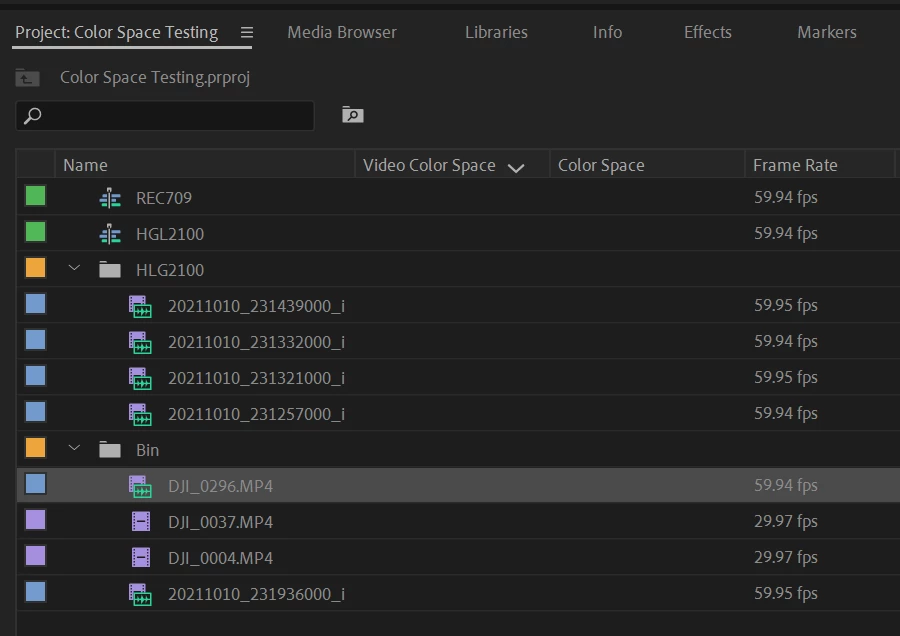
I'm trying to turn on the color space Metadata in the media project panel (see screen shot).  The media shows me color space when I "interperat" footage it is aware it's a REC709 or HGL2100 file.    Question is, how does one show the color space in the project panel properly?  the only two-color space options "Video color space" and "Color Space" are blank....


Thanks in advance.


This topic has been closed for replies.

2 replies

Participating Frequently
September 10, 2024

Following discussion.

I too use HLG and D-log M footage.  Right clicking every clip is tiring...

Participant
May 10, 2023

I came here to find an answer to the same question. It would be very convenient to NOT have to right click "Properties..." on every single clip.