This topic has been closed for replies.

2 replies

Stan Jones
Community Expert
Community Expert
May 23, 2023

Alyssa,


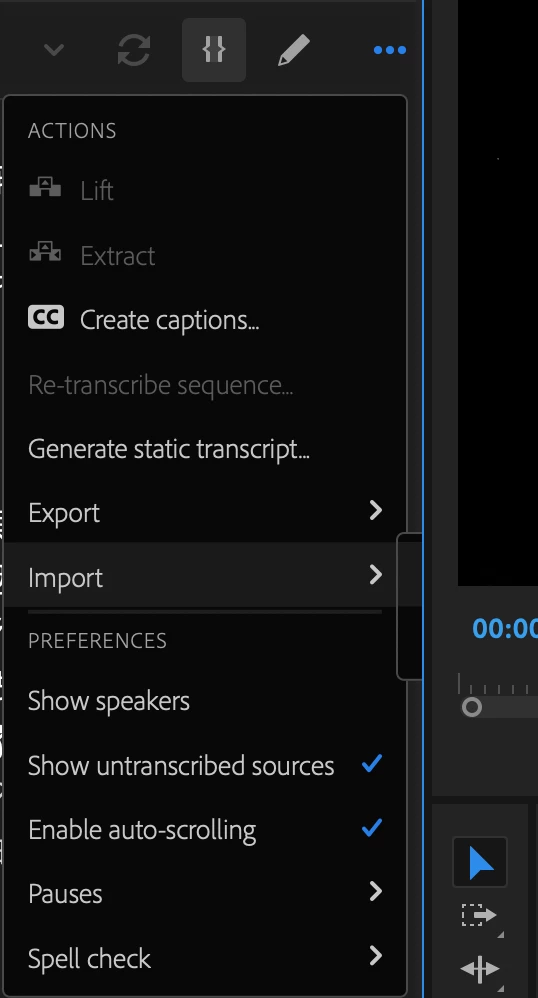
Yes, I can see the behavior you are describing. As you reduce the width of the Text panel, the "Import" submenu eventually runs out of space on the left, and tries to show on the right. But the 3 dots menu is already of the right edge, so there is never enough space on the right, and you see only the appearance of the left edge of the submenu box.


Any of the submenus ("Export" "Pauses", "Spell check") show the same behavior, but only after the Text panel is reduced even further.


I'm not sure what the fix would be here. The submenu items would have to expand outside the panel is the panel is too narrow to display them. Is that even possible? Are there any other PR panels that show the 3 dots?


A workaround, if you need to work with the Text panel very small, is to use the tilde key to maximize it before using the 3 dots.


Stan


Participant
May 23, 2023

Oh, not just on this specific workspace but on every workspace when this text panel is not wide enough.