Participant
June 6, 2020
Question

Display subtitle of mkv file

  • June 6, 2020
  • 3 replies
  • 2910 views

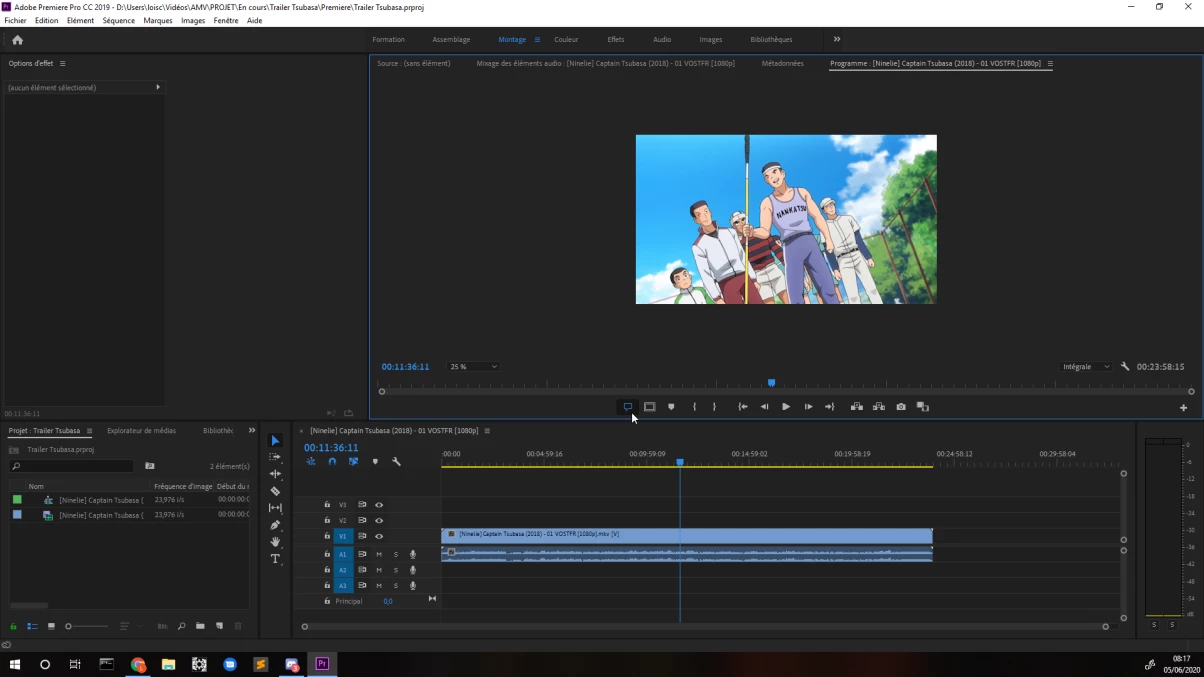
Hello, I have a problem with adobe premiere pro CC 2019. I can open my .mkv file without problem but I cannot display the subtitles associated with it in premiere pro. However, when I look at my problem on google, I am told to activate the button "activate subtitles". I did it and it doesn't change anything for me. Does anyone have an idea to solve my problem? thank you in advance
This topic has been closed for replies.

3 replies

Stan Jones
Community Expert
Community Expert
June 6, 2020

Thanks for reporting back.


Stan

Stan Jones
Community Expert
Community Expert
June 6, 2020

I think you'll need to extract the subtitle stream and import it separately.


I have not used it, but like this:

https://www.videohelp.com/software/MKVToolNix


Stan

daboderoAuthor
Participant
June 6, 2020

thanks for your help, with that tools, it's works ^^

Stan Jones
Community Expert
Community Expert
June 6, 2020

The unofficial support for mkv was officially ended with 2019.1.3, so even getting the mkv to import is a feat. Which 2019 version are you running?


In PR preferences, be sure you have selected "include captions on import."


I suspect some mkv files can embed captions that are not compatible with regular embedded captions, so who knows.


IF the embedded captions are seen by PR, and you drag the imported clip to the "new" icon, it will create a sequence with a caption track above the video. That is not present in your screenshot, so I believe you do not have captions imported.


Stan  


daboderoAuthor
Participant
June 6, 2020

My actual version is 13.0.3.


the option "include captions on import" was already activated.
indeed, when I try to create a sequence with my file, I don't have a caption track. However, when I read my file with VLC, I can choose if I want to display my subtitles or not.