
Participating Frequently
September 29, 2022
Question

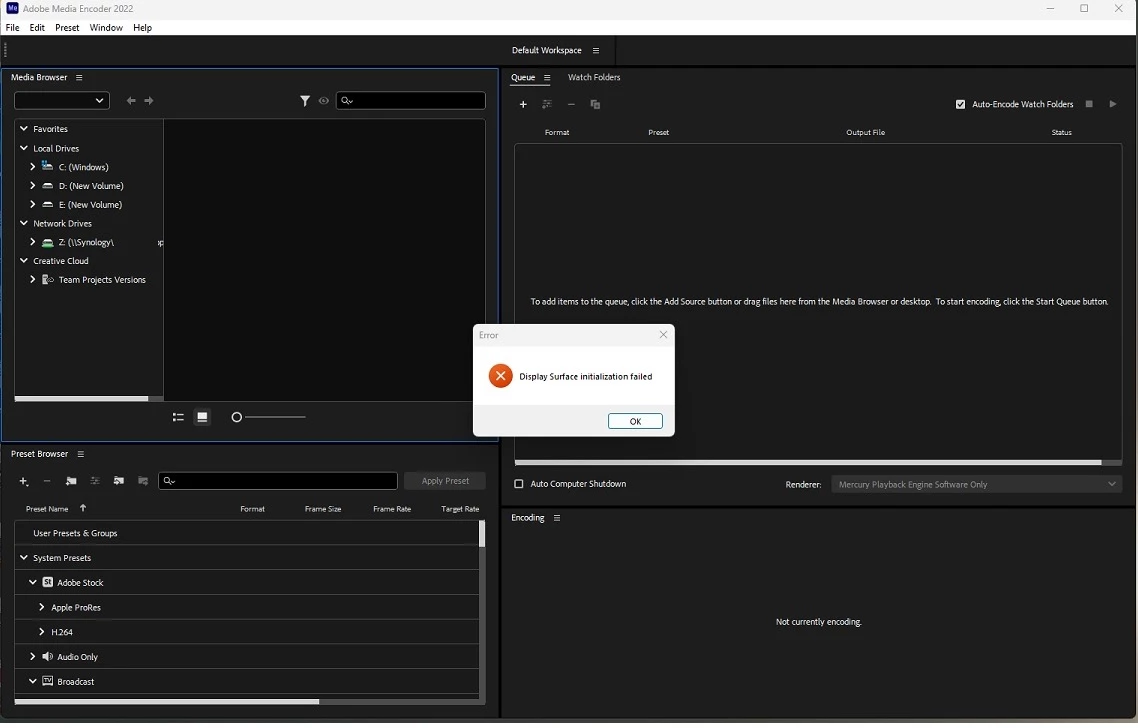
Display Surface Initialization Failed - PLEASE Help?

  • September 29, 2022
  • 2 replies
  • 3098 views

Using Windows 11(64bit)

64GB RAM

Installed on my 'D' Drive (1TB)

Also have a 256GB SSD Drive


Have been using PPro for about 5 months. Now, when I want to load it, I get this message (after a 3-4 minute wait). Other Creative Cloud applications work (Media Encoder, etc.)....


Can anyone offer up some help on this? 


Thank you


This topic has been closed for replies.

2 replies

David Simonton, DVA
Community Manager
Community Manager
September 29, 2022

Regarding the install location, I think it's unlikely to be causing this issue for you.  The Creative Cloud Desktop application allows you to specify a non-default location, and as far as I'm aware this is a supported configuration.  It's conceivable that the location or permissions associated with that location could factor into a GPUSniffer failure, which is a more likely cause of your "Display Surface initialization failed" error.

In your application's install location, there is a "gpusniffer.exe" file, and if you open a Command Prompt window and run that exe file, it may indicate a failure, and point to a possible resolution for the failure.  If it turns out that a GPUSniffer failure is causing your "Display Surface initialization failure" error, it might be resolved by a driver update, or a system reboot.  

The screen cap you shared looks like you're getting this message in AME, not PrPro, but the write-up says AME is working okay for you?  Can you share information about your graphics card(s)/driver(s)? 

Participating Frequently
September 29, 2022

David,

Thank you for taking the time to post this response. I will run the process you described and let you know how it fares. RE: The Image I posted. ME works fine, for me. I was following someone elses recommendation that I open ME prior to PP and that might resolve the issue. The image captures that it did not work for me. Sorry for the confusion.


James

Ann Bens
Community Expert
Community Expert
September 29, 2022

You need to install all software on the system drive C.