Known Participant
January 10, 2021
Answered

distorted/warped video's after reopening project

  • January 10, 2021
  • 2 replies
  • 1244 views

Hi,

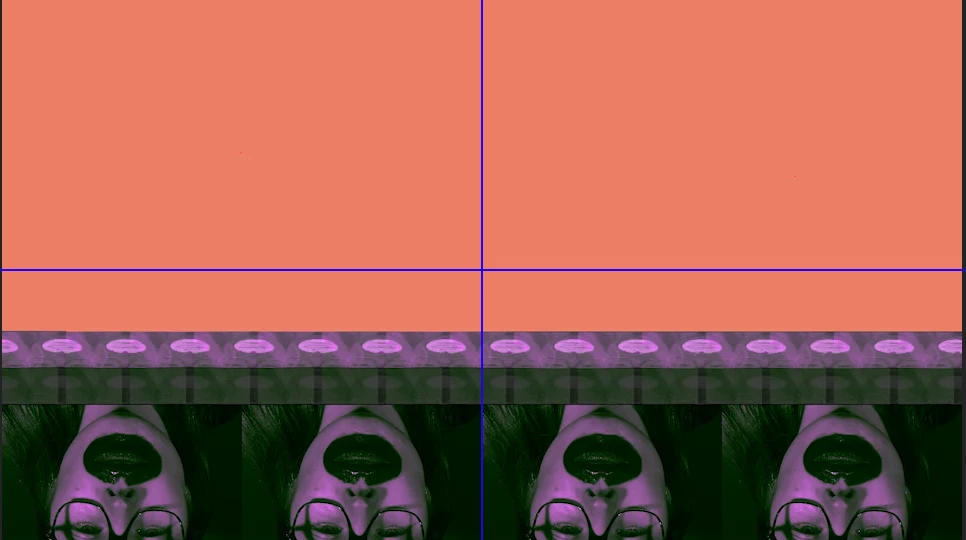
I reopened my project after working on it yesterday. But now the project in the program monitor has warped/distorted images. (see screenshot) On another occassion I had the same problem, but then I fixed it (after reading a lot of Adobe community posts) because my source material had a varaible frame rate. But now I've checked my source material (by clicking on 'properties') and its fine. 

Where lays the problem and how can I fix this?


Thank you in advance for the help and tips!
 

This topic has been closed for replies.
Correct answer R Neil Haugen

First thing I'd suggest is going back to the Project settings dialog, and for Mercury Acceleration, go to Software Only. If that fixes it, there's a graphics issue. But at least you can export.


Next, if that doesn't work, try software encoding on the export.


Also, uncheck "composite in linear color" in the Sequence settings, and see how that works.


Neil

2 replies

R Neil Haugen
R Neil HaugenCorrect answer
Legend
January 11, 2021

First thing I'd suggest is going back to the Project settings dialog, and for Mercury Acceleration, go to Software Only. If that fixes it, there's a graphics issue. But at least you can export.


Next, if that doesn't work, try software encoding on the export.


Also, uncheck "composite in linear color" in the Sequence settings, and see how that works.


Neil

Everyone's mileage always varies ...
Ann Bens
Community Expert
Community Expert
January 10, 2021

Try updating your graphicscard driver.

Known Participant
January 10, 2021

Hi Ann,

I've updated my grahicscard driver recently to MacOS Big Sur. 

I've added a screenshot of the info about my Mac .

Ann Bens
Community Expert
Community Expert
January 10, 2021

Hi, I am not really a mac person but the min system requirements for mac are 2 gig of vram.

Not sure if this also applies to an Intel gpu.

https://helpx.adobe.com/nl/premiere-pro/user-guide.html/nl/premiere-pro/system-requirements.ug.html