
Participant
November 28, 2023
Question

Don't have the option to roll back to 2023 from 2024

  • November 28, 2023
  • 2 replies
  • 504 views

Hello, my personal rig automatically updated to 2024 and I need to roll back to 2023 (thats the supported version for the MAM my company uses). Usually the "Other Versions" option is displayed under the 3 dots menu in Creative Cloud Desktop App, however all I have is Manage Plugins, Learn More, Uninstall and Add-ons.
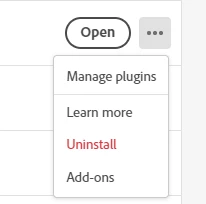
Any thoughts as to how I can install the previous version?

Thanks,

Brian

This topic has been closed for replies.

2 replies

Peru Bob
Community Expert
Community Expert
November 28, 2023

Try resetting the CC App.
To reset the Creative Cloud desktop app, make sure it's in the foreground, then press:
Win: Ctrl + Alt + R
Mac: Cmd + Opt + R

If that doesn't work, try uninstalling and reinstalling the CC App:
https://helpx.adobe.com/creative-cloud/help/uninstall-creative-cloud-desktop-app.html
https://helpx.adobe.com/download-install/kb/creative-cloud-desktop-app-download.html

If that doesn't work, please go to Adobe Customer Service (Make sure to sign in to your Adobe account first and allow popups and cookies on your browser. You may not be able to see the chat window if using a VPN.):
https://helpx.adobe.com/contact.html?rghtup=autoOpen will automatically open the chat window.
Type "Agent" in the chat box to bypass the chatbot and be connected to a person.

or X (was Twitter):
https://twitter.com/AdobeCare

SteindyAuthor
Participant
November 28, 2023

Thanks, I'll try that. In the mean time I opened a ticket with our IT to see if it's something on their end. I'll update if I get an answer


Community Expert
November 28, 2023

I would log out of your account and then log back in again.

SteindyAuthor
Participant
November 28, 2023

Yeah, that was my first thought as well. No luck. Thanks