Inspiring
March 27, 2021
Answered

Double captions display in Premiere 15 timeline

  • March 27, 2021
  • 2 replies
  • 1196 views

Hello,

I'm having trouble with the new captioning function. I opened and existing project in Premiere 15. I brought in a new video and I typed in captions (608) using the essential graphics panel and the text panel. I shut down for dinner, came back later and the program monitor displayed double captions. See below.
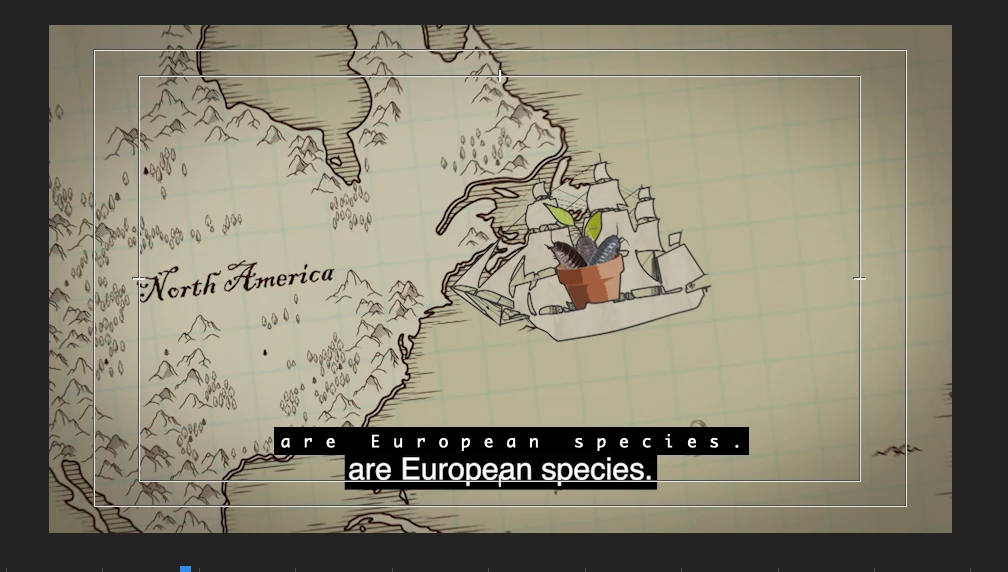
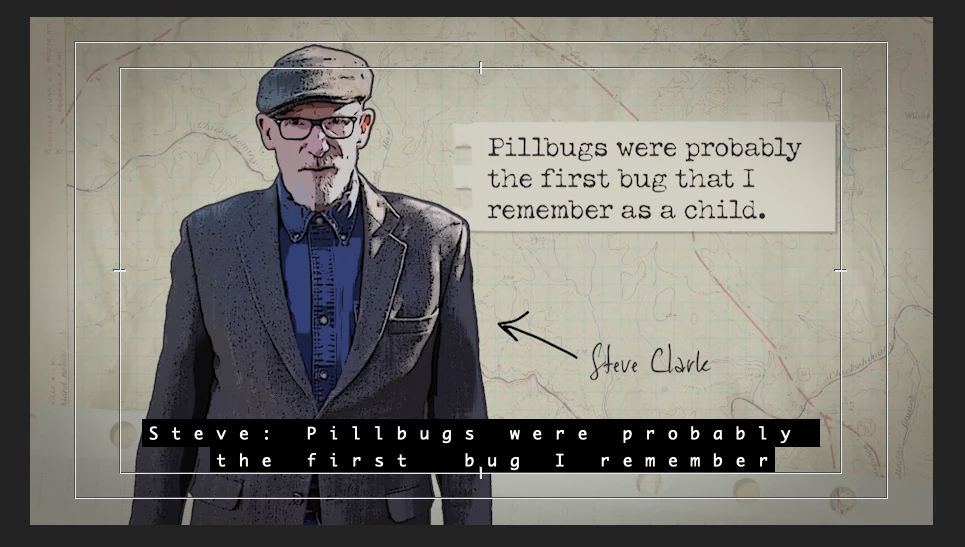
I went to "closed caption display>enable" under the program monitor wrench, to toggle the captions on and off, but it doesn't exist. Can't find it in the button editor or anywhere. I  turned off the track eyeball, and even deleted a caption clip on the caption track and got only one caption (below) but it's uneditable because the clip has been deleted--but the caption is still there, even though it isn't.
I exported a test clip with a sidecar file and reimported it into Premiere. The clip was clean. I added the sidecar file (with no track style) and the words were correct, but the style was very different than I had typed.

Any help is appreciated, especially if I'm just being stupid.

Thanks, Paul

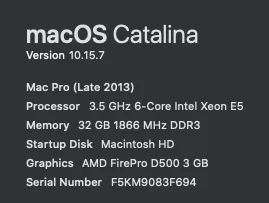
Here's my computer info :
 

This topic has been closed for replies.
Correct answer Stan Jones

You're not stupid. It's a bug for Mac. Upvote both of these reports:

https://adobe-video.uservoice.com/forums/911233-premiere-pro/suggestions/42922221-captions-are-displaying-twice-and-the-second-one

https://adobe-video.uservoice.com/forums/911233-premiere-pro/suggestions/42914085-closed-captions-in-premiere-15-getting-a-duplicate


You were using only 608 captions? One user thinks it only affects 708. The results are apparently unaffected in any event.


HOWEVER, some users are reporting issues with embed exports, so we shall see. Thanks for including your export results.


Correct: the wrench icon is no longer needed to enable caption display. The only control you have is the eyeball.


Regarding styles not being kept on reimport, there are major limits on what is exported with different sidecar types. And I suspect that none are capable of keeping the full specs on captions designed to be burned in.


Stan


2 replies

Participating Frequently
December 7, 2021

Sorry for the wait, but a fix for this issue should be in Premiere Pro 22.2 Beta build 029 (posted to Creative Cloud on Dec. 7, 2021). Please let us know your results.


Thank you.

Stan Jones
Community Expert
Stan JonesCommunity ExpertCorrect answer
Community Expert
March 27, 2021

You're not stupid. It's a bug for Mac. Upvote both of these reports:

https://adobe-video.uservoice.com/forums/911233-premiere-pro/suggestions/42922221-captions-are-displaying-twice-and-the-second-one

https://adobe-video.uservoice.com/forums/911233-premiere-pro/suggestions/42914085-closed-captions-in-premiere-15-getting-a-duplicate


You were using only 608 captions? One user thinks it only affects 708. The results are apparently unaffected in any event.


HOWEVER, some users are reporting issues with embed exports, so we shall see. Thanks for including your export results.


Correct: the wrench icon is no longer needed to enable caption display. The only control you have is the eyeball.


Regarding styles not being kept on reimport, there are major limits on what is exported with different sidecar types. And I suspect that none are capable of keeping the full specs on captions designed to be burned in.


Stan


Zeesy
Inspiring
March 29, 2021

I'm running Premiere on a Windows 10 machine and have the same problem.

Toggling the eyeball hides the large caption text, but not the small text. There is only one caption track at 708-1, although it was a 608 track before updating the project to 15.


Stan Jones
Community Expert
Community Expert
March 30, 2021

Zeesy,


Thanks for reporting this; very important. I had concluded that it might be Mac related.


See this bug report:

https://adobe-video.uservoice.com/forums/911233-premiere-pro/suggestions/42922221-captions-are-displaying-twice-and-the-second-one


I believe Mitch Wood must be an Adobe employee who is asking for info for their work on this. I suggest you post a comment there, with screenshots of your Text Panel, Timeline, and Program Monitor. And give your basic PC specs.


Stan