Mitzleplick8867
Inspiring
March 15, 2022
Answered

Double captions showing in timeline

  • March 15, 2022
  • 2 replies
  • 803 views

Hello,


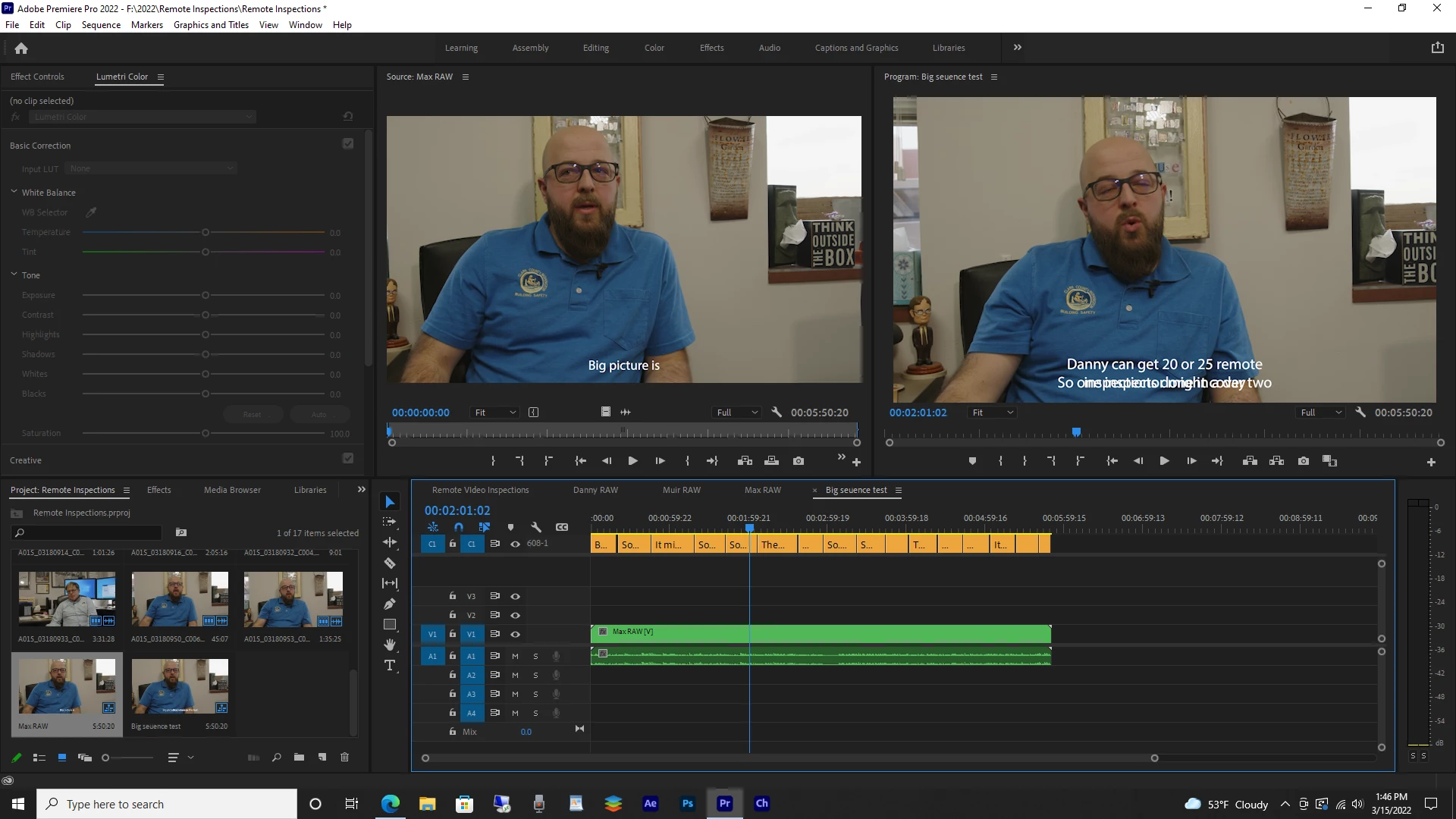
I'm trying out the Captions feature in Premiere. I captioned a video  just fine. However, when I have that video in the Source Monitor and want to edit it into a larger sequence (that has no captions yet) I see double image of the captions, yet only one caption track. Can someone explain this? I've included a screen shot of the double image. 

This topic has been closed for replies.
Correct answer Mitzleplick8867

I'm going to persist: you say there is only one caption track - that may be true when you look in each sequence. But, I can see that, in the Source monitor, Max Raw has a caption track. And, in the timeline, Big Sequence Test has a caption track. When you nest Max Raw into a sequence, the caption track is no longer a caption track, but it shows the captions in the nest.


Stan


Stan,


Thank you for persisting! Yes, so to clarify even more. We have a program that in the end is a 30 minute show. This is comprised of 5 segments, each edited by a different person. I have to then take each sequence and import their SRT's into a Final 30 minute show and export an SCC file for air. So, you were correct. The captions for each story are nested in the Source. When I disable the captions track that is in the Final sequence, they play correctly. However, when I go to export, the captions are burned into the video, even though, I select sidecar file in the captions export. So, for the captions export, I go to Export - Captions and select SCC file. Once those are exported, I then disable the captions from the video altogether and do a clean MPG 4 export that will go with that SCC file for air. In the end it all works. Thank you for the help!
2 replies

Stan Jones
Community Expert
Community Expert
March 16, 2022

Kevin has one possibility; I'll suggest another:


You are nesting the sequence Max Raw into the sequence Big Sequence Test. And we can see from the Source Monitor that Max Raw has captions. When you nest a sequence with captions into another sequence, they show in the new sequence as part of the video from the sequence.


Disable the captions in the sequence Max Raw (click the eyeball icon in the Caption track header), and they will no longer show in the Big Sequence Test.


Stan


Mitzleplick8867
Inspiring
March 24, 2022

Hi,


Thanks for the suggestions. I did check the tracks. There is only one caption track. Secondly, when I disabled the caption track on the Source sequence, the Program sequence would only show one line of cation for several edits. So, that didn't work either. What I could do, is make a sequence with the captions and export from the source clip. This would eliminate the Program Monitor sequence double image. I'll try this next. 


Stan Jones
Community Expert
Community Expert
March 24, 2022

I'm going to persist: you say there is only one caption track - that may be true when you look in each sequence. But, I can see that, in the Source monitor, Max Raw has a caption track. And, in the timeline, Big Sequence Test has a caption track. When you nest Max Raw into a sequence, the caption track is no longer a caption track, but it shows the captions in the nest.


Stan


Kevin J. Monahan Jr.
Legend
March 15, 2022

Hey there Mitzleplick,

Sorry for this problem, first of all. I think I see what's occurring. If you scroll up the Timeline, a second track might be revealed. If you see a second text track, you can delete the text object you do not need. You can then place them all on the same track by dragging them back down. Perhaps you did a second transcription on the same area of the timeline. If so, yes, this has also happened to me too. I hope the advice gets you back on track. 🙂


Thanks,
Kevin

Kevin Monahan - Sr. Community and Engagement Strategist – Adobe Pro Video and Audio