
Participant
August 1, 2021
Answered

Double Clicking Bin not opening in new window

  • August 1, 2021
  • 2 replies
  • 2516 views

Premiere Pro 2018,

Single Monitor,

Preferences Set to 'Double Click' on Folder => Open in new window

Windows 10

____

When I double click on a bin  inAssembly Panel, it just opens up the contents of that bin. I want to open it up in a new window, as I have seen in a video tutorial. I have checked with Edit -> preferences => double click option and tried it with different combo of Alt, Ctrl, Simple Double click options, Nothing works.

Please guide.

Thanks in advance/
This topic has been closed for replies.
Correct answer Shrikant0101

Latest update

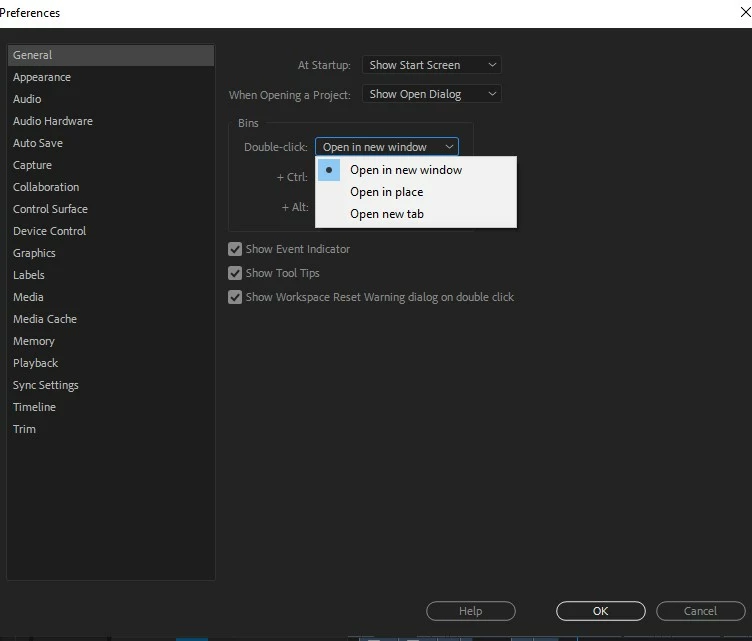
My problem is solved. I set preferences => General => Bins => Double Click on Bin = Open in New Window as shown in attached screen shot. It is working now.

Before that I had reset my system setting by holding down shift/Control/Alt keys while starting Prem Pro as suggested by Rob.

Thenks everyone for responding

2 replies

Shrikant0101AuthorCorrect answer
Participant
August 10, 2021

Latest update

My problem is solved. I set preferences => General => Bins => Double Click on Bin = Open in New Window as shown in attached screen shot. It is working now.

Before that I had reset my system setting by holding down shift/Control/Alt keys while starting Prem Pro as suggested by Rob.

Thenks everyone for responding

Community Expert
August 1, 2021

I would try resetting preferences.

Close Premiere then hold down Shift/Control/Option while clicking on the icon to open the app.

Keep holding the keys and let your system make changes.

Hopefully this will help.


Participant
August 6, 2021

Thanks Rob for your help.

But it did not work.

I discovered that what was happening was that after I doble click on the Folder, it would next open up the detailed list inside of that folder in the same place, instead of opening up a new window as should usually be the case. 

Then I tried to 'undock' that window. And it worked. The detailed list of the contents of the folder then became the new Window.

This is not an ideal solution.But somehow it works with an additional step. 

I was wondering if there could be an option in the 'Preference' menu something like this

Double Click on Folder - (Select Option)     1 Opens up New Window

                                                                        2 Opnes up in the same Window


_______

May be some keyboard shortcuts outside the Premiere Pro or in Windows Default (if there is any) are overriding on the Premiere Pro shortcuts and neutralising them. Perhaps there is a way to make PP shortcuts override the System shortcuts or the shortcuts of other programms. 

______

Though somehow I managed to achieve my goal, my original question is still begging for a solution.