Legend
November 10, 2020
Answered

Drag and Drop Files Not Working

  • November 10, 2020
  • 12 replies
  • 22944 views

Hello Everyone.

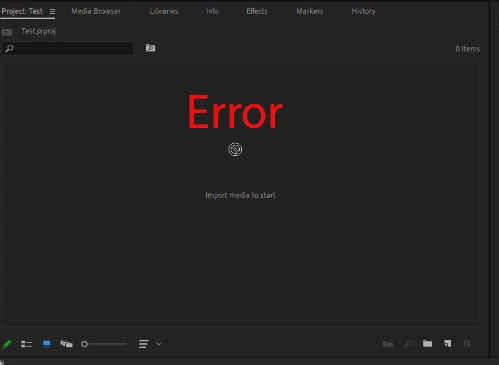
I can Import files into Premiere, but If I drag any Clip, Image, Sound Clips, I see the Error sign.

I noticed this is also happening with Audition, and After Effects. I think there could be some kind of Compatibility issue between Windows and Adobe.

Would you please help?

Thank you very much.
This topic has been closed for replies.
Correct answer animationlife

UPDATE: UPDATE: UPDATE;

I FIXED THE ISSUE. THIS IS WHAT I DID

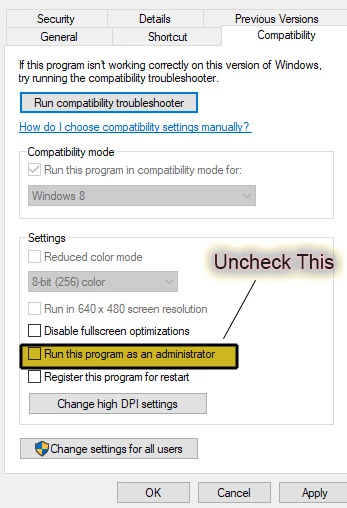
Right Click on Premier Pro-More- Open File Location- Right-click on Premiere Pro- Properties- Compatibility

I Unchecked Run this Program as an administrator.

Also, I did it for After Effects, and Audition.

Now If I want to drag/drop from explorer it works.

Here is the screenshot:

12 replies

Community Expert
November 10, 2020

What kind of media do you have? Codec(s) and format?


Can you import any other way, like through Media Browser or the import dialogue?

MyerPj
Community Expert
Community Expert
November 10, 2020

I don't know if I've ever seen a big ERROR message like that.


Are the files coming from your SSD or a memory card, etc. Is it just a coincidence that your project has nothing in it from the screenshot? You said you "could import", so, then the rest of the dragging, etc I would asume from your post is from an already imported clip, and the screen shot is not representative?