Participant
November 8, 2019
Answered

Drag and drop from explorer just works one time to premiere

  • November 8, 2019
  • 3 replies
  • 356 views

I can drag and drop clip (20 seconds clip) from explorer (W10) to premiere 14.0.0 Next clip can only land in "Audio track" . I have to restart premiere for next clip and so on for every clip.
 

This topic has been closed for replies.
Correct answer Ann Bens

3 replies

Ann Bens
Community Expert
Ann BensCommunity ExpertCorrect answer
Community Expert
November 8, 2019

Participant
November 8, 2019

That seems to work. Thank you

Gilbert

Peru Bob
Community Expert
Community Expert
November 8, 2019

Try resetting the preferences:
https://community.adobe.com/t5/Premiere-Pro/FAQ-How-to-reset-trash-preferences-in-Premiere-Pro/td-p/8236158

If that doesn't work, try resetting the Workspaces:
Reset a workspace
Reset the current workspace to return to its original, saved layout of panels.
1. Do one of the following:
• Click the Workspace menu icon and select Reset to Saved Layout.
• Choose Window > Workspace > Reset to Saved Layout.
from here:
https://helpx.adobe.com/premiere-pro/using/workspaces.html

If that doesn’t work, try updating or rolling back your graphics driver directly from the video card manufacturer’s site.

Kevin J. Monahan Jr.
Legend
November 8, 2019

Gibbe,

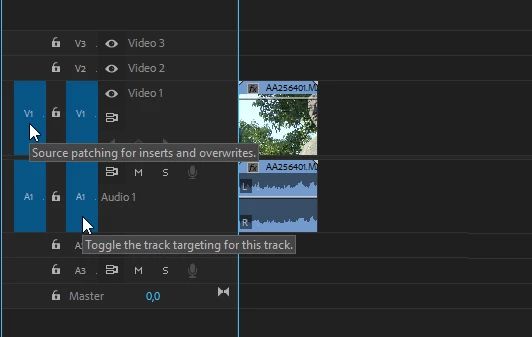
This is not good technique as your A1 and V1 patch panels very often won't work on the second round. Import all your files into the Project panel first. When dragging from there, make sure all 4 blue boxes for A1 and V1 are enabled. Then your clips can be inserted or overwrote correctly into the Timeline.

The developers intention, and editors historically is to to organize clips prior to placing them into the Timeline. If you want a different behavior, make a feature request here.


Thanks,
Kevin

Kevin Monahan - Sr. Community and Engagement Strategist – Adobe Pro Video and Audio