d0paminefiend
Participant
January 15, 2018
Answered

Drag sequence onto another sequence without audio track?

  • January 15, 2018
  • 1 reply
  • 1176 views

I've built multiple tracks of Essential Graphics lower thirds on a sequence with transitions. I do this so if changes are made to the original lower thirds sequence, the change reflects on every sequence the lower thirds are on (like CSS). I drag that sequence onto other sequences and an audio track is dragged with the video track, which I don't want. I have to unlink the audio and video tracks then delete the audio track. Is it possible to create a sequence with no audio so when it's dragged only the video track is included?
This topic has been closed for replies.
Correct answer jasontcox

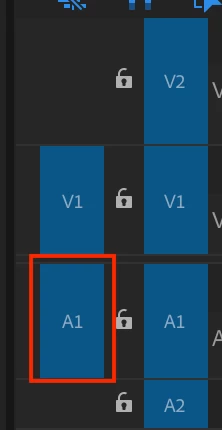
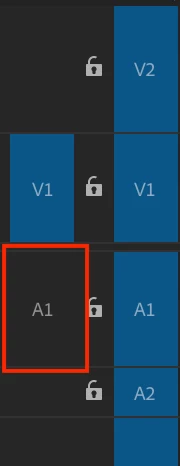
Well, yes and no. When nesting a sequence, it will always want to bring in an audio track, even if you haven't placed any audio clips in any audio track. However, there is a slightly faster workflow than you've got currently. Select the sequence you want to nest and then you need to deselect the Audio Source Patch panel. This is the blue A1 to the left of the track lock icon. If you click it and the blue disappears, now when you drag the sequence, it won't try and occupy an audio track!

Click this:

And then it should look like this:

1 reply

jasontcox
jasontcoxCorrect answer
Inspiring
January 15, 2018

Well, yes and no. When nesting a sequence, it will always want to bring in an audio track, even if you haven't placed any audio clips in any audio track. However, there is a slightly faster workflow than you've got currently. Select the sequence you want to nest and then you need to deselect the Audio Source Patch panel. This is the blue A1 to the left of the track lock icon. If you click it and the blue disappears, now when you drag the sequence, it won't try and occupy an audio track!

Click this:

And then it should look like this: